
Most WordPress sites are optimised for Google. That’s it. One search engine. One set of rules.
But the search landscape shifted under everyone’s feet. ChatGPT now handles over 800 million weekly active users. Perplexity processes millions of queries a day. Google’s own AI Overviews appear on roughly 16% of searches and rising. If your WordPress site isn’t set up for those too, you’re missing a growing chunk of the internet.
That’s what Answer Engine Optimization is. Getting your site found, read, and cited by AI engines, not just ranked in traditional search results. And the tooling for it is still early. Most WordPress plugin developers haven’t caught up.
Here are five tools that close the gap.
- – AEO God Mode = the only WordPress plugin built for the full AEO stack (AI crawlers, llms.txt, schema, citation tracking, content gaps). Free core on WordPress.org
- – Rank Math or Yoast = your base SEO layer for titles, metas, sitemaps, and basic schema
- – WP Rocket = fast response times keep AI crawlers from skipping your pages
- – Cloudflare = network-level bot access control so AI crawlers don’t overwhelm your server
- – GSC + Bing Webmaster Tools = crawl validation plus Bing’s new AI Performance dashboard for citation tracking
- – Bottom line: Five tools, most of them free. The sites that set this stack up now get a head start over those that wait
Before picking tools, run through the 23-factor 2026 WordPress AEO checklist to see which signals your current stack already covers and where the real gaps are.
1. A Dedicated AEO Plugin (AEO God Mode)
Traditional SEO plugins handle titles, metas, XML sitemaps, and basic schema. They were built for Google’s crawler. None of them track AI bots, generate llms.txt files, or tell you whether ChatGPT actually cites your content.
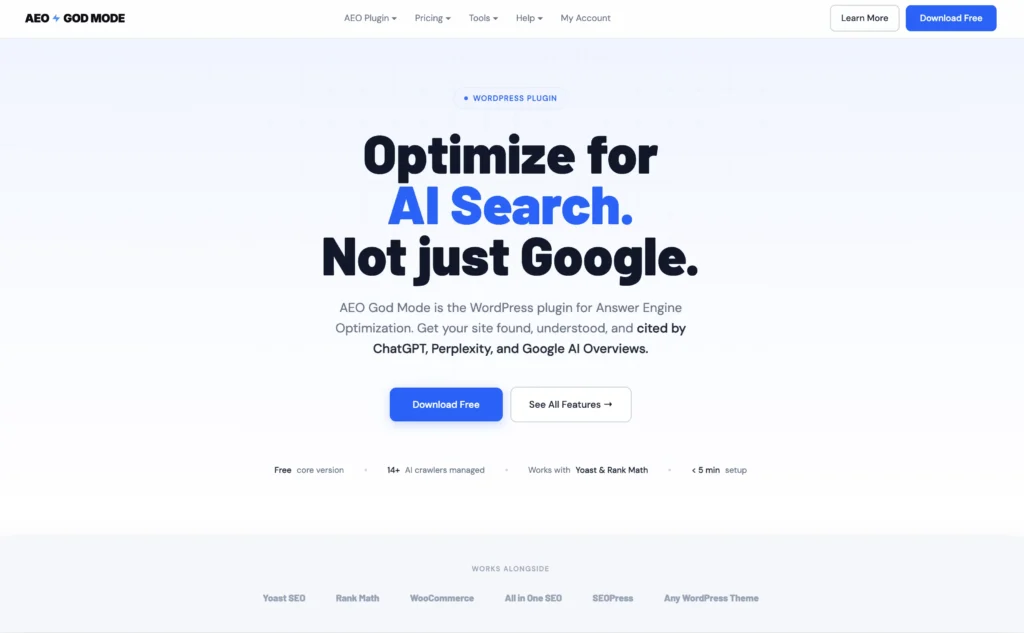
The AEO God Mode WordPress plugin fills that gap. It’s the only WordPress plugin built specifically for the full answer engine optimization stack.
What the free version covers
- AI crawler access management for 14 bots (GPTBot, PerplexityBot, ClaudeBot, Google-Extended, Bytespider, and more)
- Automatic llms.txt generation following the official spec
- Schema markup injection for eight types (Article, FAQPage, HowTo, Product, LocalBusiness, Organization, WebSite, BreadcrumbList)
- A Content Gap Scanner that audits every published page for missing AEO signals
- A Schema Validator
- A Conflict Detector that prevents duplicate markup when running alongside other SEO plugins
What Pro adds
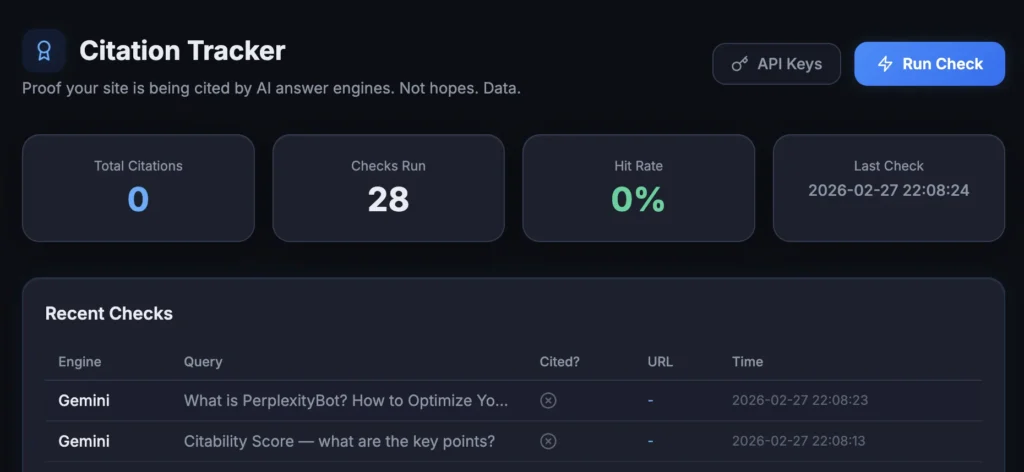
- A Citation Tracker that queries ChatGPT, Perplexity, Gemini, and Claude to check whether your domain appears in real AI responses
- A Citability Score that grades each page from A to F based on 10 signals
- AI Referral Traffic analytics
- E-E-A-T schema enrichment
- Google Search Console integration
Works alongside your existing SEO plugin
AEO God Mode detects Rank Math, Yoast, and AIOSEO on install, imports relevant settings, and never touches your title tags or meta descriptions. If both plugins handle the same schema type, you choose which one stays active. Zero conflicts.
You don’t replace your SEO plugin with this. You add it on top.
2. Rank Math or Yoast SEO (Your Base Layer)
You need one. Not both.
Rank Math and Yoast SEO handle the foundation: title tags, meta descriptions, XML sitemaps, Open Graph, canonical URLs, and basic schema. Every WordPress site should have one of these installed before thinking about AEO.
Rank Math recently added partial llms.txt support, which is a step in the right direction. It also has a more flexible schema builder and covers more structured data types out of the box. If you’re starting fresh, Rank Math is the stronger pick right now.
Yoast SEO is still the most installed SEO plugin on WordPress. It does little for AI crawlers or citations specifically. But its sitemap generation, meta tag management, and content analysis are battle-tested. If you’re already using it and everything works, there’s no reason to swap.
Either way, your base SEO plugin handles the traditional search signals. A dedicated AEO tool handles the AI-specific signals. They serve different purposes and complement each other.
3. WP Rocket (Speed for AI Crawlers)
AI crawlers behave a lot like Googlebot when it comes to performance. Slow pages get crawled less frequently, or skipped entirely.
WP Rocket is the most reliable caching plugin for WordPress. It handles page caching, file minification, lazy loading, and database cleanup. The result is faster TTFB (Time to First Byte), which matters for both human visitors and automated crawlers.
GPTBot and PerplexityBot don’t wait around. If your server takes three seconds to respond, they move on. A cached page that responds in 200ms gets crawled thoroughly.
AI engines crawl at volume. Perplexity alone sends its bot across thousands of pages per session. If your server slows down or rate-limits the connection, you lose coverage. WP Rocket keeps your response times consistent even under crawl pressure.
There are free alternatives (LiteSpeed Cache, W3 Total Cache) that work fine. WP Rocket just requires the least configuration to get right.
4. Cloudflare (Bot Access Control)
Not a WordPress plugin. But Cloudflare’s free tier gives you something no plugin can: network-level control over which bots access your site and at what rate.
This matters because AI bot traffic is growing fast, and not all of it is welcome. Some AI scrapers will hammer your server with hundreds of requests per minute. Cloudflare lets you set rate limits per bot, block specific crawlers, and allow the ones you actually want (GPTBot, PerplexityBot, ClaudeBot) without risking server overload.
You want AI engines to crawl your site. You don’t want them to crash it. Cloudflare sits between your server and every incoming request, so you can be selective. Allow the major AI crawlers, rate-limit aggressive scrapers, and block the ones that just take without attribution.
Set it up before installing anything else. It takes 15 minutes and protects everything downstream.
5. Google Search Console + Bing Webmaster Tools (The Ground Truth)
You want both. Not one or the other.
Google Search Console
Google Search Console is still the single best source of crawl data for any website. Free. Nothing else matches it for coverage reports, index status, and structured data validation.
What to look for in GSC:
- Pages that Google indexes but AI bots skip (possible robots.txt issue)
- Pages with valid schema in GSC validation but no citations in AI responses (content structure might need work)
- Crawl stat spikes that coincide with new AI bot activity in your server logs
Bing Webmaster Tools
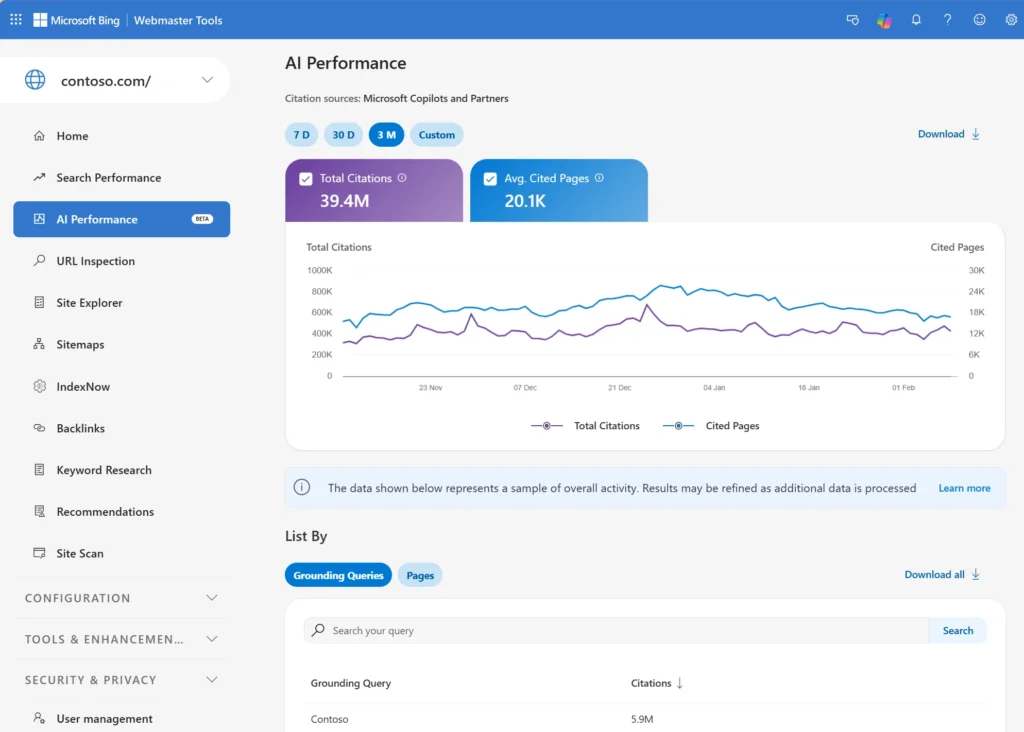
Bing Webmaster Tools is actually ahead of Google on the AI curve right now.
In February 2026, Microsoft launched “AI Performance” in Bing Webmaster Tools as a public preview. It’s the first webmaster tool from a major search engine that tracks AI citations directly.
The dashboard shows:
- Total citations (how often your content is referenced in AI-generated answers across Copilot and Bing AI summaries)
- Average cited pages per day
- Grounding queries (the key phrases AI used when retrieving your content)
- Page-level citation activity so you can see which specific URLs get cited most often
That’s real citation tracking built into a free webmaster tool. Google Search Console doesn’t offer anything like it yet.
What to look for in Bing Webmaster Tools:
- Which pages are being cited in AI answers and how often
- Which grounding queries pull your content into AI responses
- Whether citation activity trends up or down after you update content
- Pages that are indexed but rarely cited (they might need better structure, clearer headings, or FAQ sections)
Bing also recommends using IndexNow to keep content fresh across both search and AI experiences, since AI systems tend to reference the most current version of a page when generating answers.
Set up both. GSC covers the traditional search baseline. Bing Webmaster Tools gives you the AI citation layer that no other free tool provides right now. Together, they’re the closest thing to a full visibility dashboard for how every major system interacts with your content.
How the Stack Fits Together
These five tools aren’t random picks. They form a specific stack where each layer handles something the others can’t.
| Layer | What It Handles |
|---|---|
| Cloudflare | Network-level bot access, rate limiting, DDoS protection |
| WP Rocket | Page speed, caching, crawl-ready response times |
| Rank Math / Yoast | Traditional SEO: titles, metas, sitemaps, basic schema |
| AEO God Mode | AI crawlers, llms.txt, AEO schema, citation tracking, content gaps |
| GSC + Bing Webmaster Tools | Crawl validation, indexing data, structured data reports, AI performance tracking |
The order matters too. Set up Cloudflare first so your server is protected. Install WP Rocket to handle speed. Add your base SEO plugin (Rank Math or Yoast). Then layer on AEO God Mode for the AI-specific signals. Connect Google Search Console and Bing Webmaster Tools to validate everything.
Each tool does one job well. None of them try to do everything. That’s what makes this stack reliable instead of bloated.
What Happens If You Don’t Set This Up?
Right now, most WordPress sites are invisible to AI search. That’s not a hypothetical problem for the future. It’s happening today.
When someone asks ChatGPT for a product recommendation in your niche, your competitor’s site shows up. Not yours. When Perplexity answers a question your blog post covers perfectly, it cites a different source. When Google’s AI Overview pulls an answer from structured data, it uses the page that has valid schema, not the one that doesn’t.
None of this fixes itself. Google didn’t wait for websites to learn SEO before ranking results. AI engines aren’t waiting either.
Five tools. All available today. Most of them free. The WordPress sites that set this up now will have a significant head start over those that wait.
Frequently Asked Questions
What are the best AEO tools for WordPress in 2026?
The five tools you need are: AEO God Mode (dedicated AEO plugin), Rank Math or Yoast SEO (base SEO layer), WP Rocket (speed and caching), Cloudflare (bot access control), and Google Search Console plus Bing Webmaster Tools (crawl data and AI citation tracking).
Do I need a separate AEO plugin if I already use Rank Math or Yoast?
Yes. Rank Math and Yoast handle traditional SEO signals like title tags, metas, and sitemaps. They don’t track AI crawlers, generate llms.txt files, scan for content gaps specific to AI engines, or monitor whether AI systems cite your content. AEO God Mode handles the AI-specific layer and works alongside both plugins without conflicts.
Is AEO God Mode free?
The core version is free on WordPress.org. It includes AI crawler management, llms.txt generation, 8 schema types with auto-detection, content gap scanning, conflict detection, and a schema validator. Pro costs £9 per month or £90 per year and adds citation tracking, citability scoring, E-E-A-T enrichment, AI referral analytics, and Google Search Console integration.
Why does page speed matter for AEO?
AI crawlers behave like search engine bots when it comes to performance. Slow pages get crawled less frequently or skipped entirely. GPTBot and PerplexityBot move on if your server takes more than a few seconds to respond. A cached page responding in 200ms gets crawled thoroughly. WP Rocket or similar caching plugins keep response times fast and consistent.
Does Bing Webmaster Tools track AI citations?
Yes. In February 2026, Microsoft launched AI Performance in Bing Webmaster Tools as a public preview. It tracks total citations across Copilot and Bing AI summaries, shows grounding queries, average cited pages per day, and page-level citation activity. Google Search Console does not offer anything similar yet.
What order should I install these tools?
Set up Cloudflare first for server protection. Install WP Rocket for speed. Add Rank Math or Yoast for traditional SEO. Layer on AEO God Mode for AI-specific signals. Connect Google Search Console and Bing Webmaster Tools to validate everything. Each tool handles a different layer of the stack.