


Xagio is a strong fit for agencies that want SEO planning, websites, hosting and client work in one broad system. Its reach goes far beyond a focused AEO plugin.
People often compare Xagio alternatives before buying when they want to keep their hosting and SEO stack, need a smaller AEO tool, or prefer simpler pricing. Existing users may also want a focused citation, content or Search Console workflow without moving wider agency operations.
The central choice is focused AEO work versus a wider agency platform. This guide compares the tools by setup, scope, evidence, cost and the parts of your current stack they may replace.
The short answer
| Product | Best for | How it fits WordPress | Keeps your SEO plugin | Starting price |
|---|---|---|---|---|
| Xagio | agency SEO, websites and hosting | Broad agency platform | Depends on the chosen stack | From $97/month when checked |
| AEO God Mode | evidence-to-action AEO | Works beside your SEO plugin | Yes | Free; Pro from $19/month billed yearly |
| ThinkRank | a full SEO migration with MCP control | Replaces your SEO plugin | No, it replaces it | Free; paid from $49.50/year when checked |
| Squirrly GEO | guided all-in-one SEO and GEO | Broad SEO suite | Compatibility mode available | Free; Pro from $9.99/month when checked |
| GetGenie | research and AI-assisted writing | Writing and research tool | Yes | Free; paid from $9.99/month when checked |
| Visibility | a lightweight local SEO replacement | Replaces your SEO plugin | No, it replaces it | Free with no paid tier |
Disclosure: AEO God Mode is our product. We used the same checks for every tool. We linked the official pages used for features, prices and limits.
We checked WordPress.org pages, product guides and prices. We also tried each visible setup and workflow. “Not documented” means we didn’t find the feature. The maker may add it later.
The RankReady alternatives comparison explains the local technical-companion model. The EZY.ai alternatives guide covers the opposite choice: a connected service that can automate more work.
Why people look for Xagio alternatives

Best for
Xagio is best for agency SEO, websites and hosting.
What Xagio does well
Xagio combines several products. Its WordPress tools cover SEO, keyword plans, clustering, rank tracking, Search Console, redirects, links, llms.txt and Open Knowledge Format.
Agent X adds site building, hosting, backups and white-label work.
Project Planner joins keywords, pages, rankings and competitor data. Niche Hunter and Silo Builder help with opportunities and site structure.
This makes Xagio an agency production system, not only an AEO dashboard.
Why buyers compare alternatives
Xags pay for many kinds of work, such as builds, hosting, rank checks and audits. A direct price match with a small AEO plugin would be unfair because the scope is much larger.
Compare the full set of tools your team would replace.
Choose Xagio when you want to join SEO, sites, hosting and agency work. Choose a focused tool when your hosting and SEO stack should stay and the missing job is citation evidence or page action.
Its broad reporting can be compared with a focused Search Console workflow that links query and indexing issues to exact pages.
Pricing and setup
Broad agency platform. The summary card shows the pricing published with this guide on 30 August 2026. Confirm the latest limits and billing terms in the official pricing before you buy.
Pros and trade-offs
- ✓Project Planner, clustering, competitor research and rank tracking
- ✓Metadata, schema, sitemaps, Search Console, redirects and content silos
- ✓Agent X site generation, templates, hosting, backups and white label
- ✓llms.txt, robots controls and Open Knowledge Format outputs
- ✗Far broader and more expensive than a focused AEO companion
- ✗Xags fund hosting, builds, research, audits and tracking rather than only AEO work
- ✗No same-shape saved-question citation-history workflow was documented in the reviewed sources
Start with the job your team must finish each week. Do you need a local tool, a full SEO move or a hosted service? Do you need writing or proof that leads to action? Your answer removes many false matches.
Choose the right kind of tool
Ask three questions before you compare feature lists.
- Who controls your SEO? A replacement can create titles, schema and sitemaps. Two plugins should not control the same output.
- What proof do you need? Local logs, Search Console, referrals and answer checks prove different things.
- What happens next? A useful report should lead to a page, link, draft or other clear task.
A bigger menu doesn’t make a tool a better fit. What matters is whether it helps your team finish the weekly job.
Try each option on the same real task. Keep the result your team can explain and repeat.
If you need more control over the technical setup, compare how each tool handles structured data and machine-readable publishing. They cover different parts of the foundation.
AEO God Mode
 AEO God Mode
Best for
AEO God Mode is best for evidence-to-action AEO.
AEO God Mode starts with three simple questions. What do we know?
What should we change? Did the change help?
It keeps each kind of proof separate, so the numbers stay honest. Search Console, crawler visits, AI referrals, indexed mentions and direct answer checks all tell you something different.
The useful part is what happens next. If a tracked question misses your site, you can find the page to improve, plan a new page, study the sources that were cited or add a useful internal link.
Smart Internal Linking finds strong source passages across your site. You review every suggestion before it changes a post.
Topical Map groups real gaps into a clear publishing plan instead of handing you a loose keyword list.
Why choose AEO God Mode instead of Xagio
Choose AEO God Mode instead of Xagio when your current SEO plugin works and you need citation evidence, Search Console priorities and guided page actions in WordPress.
Its Citation Tracker saves the returned sources for chosen questions, so an editor can compare real answers over time.
What you give up
The AEO God Mode writing tools go far beyond schema and llms.txt. The Knowledge Base can ground a draft in facts you supplied.
The Repurpose Content feature turns one approved post into editable YouTube, X and LinkedIn material. Visual Content Blocks turn useful facts into native WordPress blocks.
Crawler controls, logs, llms.txt and schema checks are still included, but they support the wider find-it, fix-it and measure-it workflow.
Some AEO God Mode AI tasks use monthly plan credits. You can also use your own provider keys for parts of Citation Tracker.
This is easier for people who don’t want to set up several AI accounts. A very high-volume team should still compare the plan allowance with the cost and upkeep of using its own keys.
No plugin can promise citations. AEO God Mode helps you do better work and record what happened.
Pricing and setup
Works beside your SEO plugin. The summary card shows the pricing published with this guide on 30 August 2026. Confirm the latest limits and billing terms in the official pricing before you buy.
Pros and trade-offs
- ✓Selected-question Citation Tracker across supported answer engines
- ✓Google Search Console query, page and indexing workflows
- ✓Smart Internal Linking, Content Health, Link Health and Answer Density
- ✓Knowledge-Base-grounded drafting, topical planning, repurposing and native content blocks
- ✗Some AI actions consume finite monthly plan credits
- ✗Pro is licensed per site and Growth is required for broader market/indexed-mention workflows
- ✗It complements rather than replaces a traditional SEO plugin

ThinkRank

Best for
ThinkRank is best for a full SEO migration with MCP control.
ThinkRank is a full SEO system, not a small AEO add-on. It handles titles, schema, sitemaps, robots rules, Local SEO, Search Console, GA4 and IndexNow.
It can move data from Rank Math, Yoast, AIOSEO and SEOPress.
Its MCP server lets a compatible assistant call WordPress SEO tools after you turn it on. You can also add your own OpenAI, Claude, Gemini or OpenRouter keys.
This gives you control, but you must protect the keys and manage provider bills and limits.
Why choose ThinkRank instead of Xagio
Choose ThinkRank instead of Xagio when you want to replace the full SEO stack and control it through WordPress or a compatible AI assistant.
Before replacing an SEO plugin, use a Schema Validator to check which tool is publishing each schema type.
What you give up
Brand Visibility runs real answer checks with your AI keys. The free check is small and manual.
Repeat checks, more platforms, competitors and longer history are paid. ThinkRank also keeps passive AI traffic separate from returned answers, which is the right way to read the evidence.
Choose ThinkRank when you want one SEO system and are ready to plan a migration. It is a bigger change for a mature site because two plugins should not control the same titles, schema or sitemaps.
Pricing and setup
Replaces your SEO plugin. The summary card shows the pricing published with this guide on 30 August 2026. Confirm the latest limits and billing terms in the official pricing before you buy.
Pros and trade-offs
- ✓Traditional SEO, schema, sitemaps, metadata, Local SEO and migration
- ✓Self-hosted MCP server for compatible assistants
- ✓OpenAI, Anthropic, Gemini, OpenRouter and compatible provider keys
- ✓Search Console, GA4, IndexNow, llms.txt and paid internal-link/rank tooling
- ✗It replaces rather than simply complements the current SEO plugin
- ✗ThinkRank doesn’t meter credits, but calls through your own provider keys can still cost money
- ✗Official plan pages were not perfectly consistent about the first paid tier for every feature
Squirrly GEO
Best for
Squirrly GEO is best for guided all-in-one SEO and GEO.
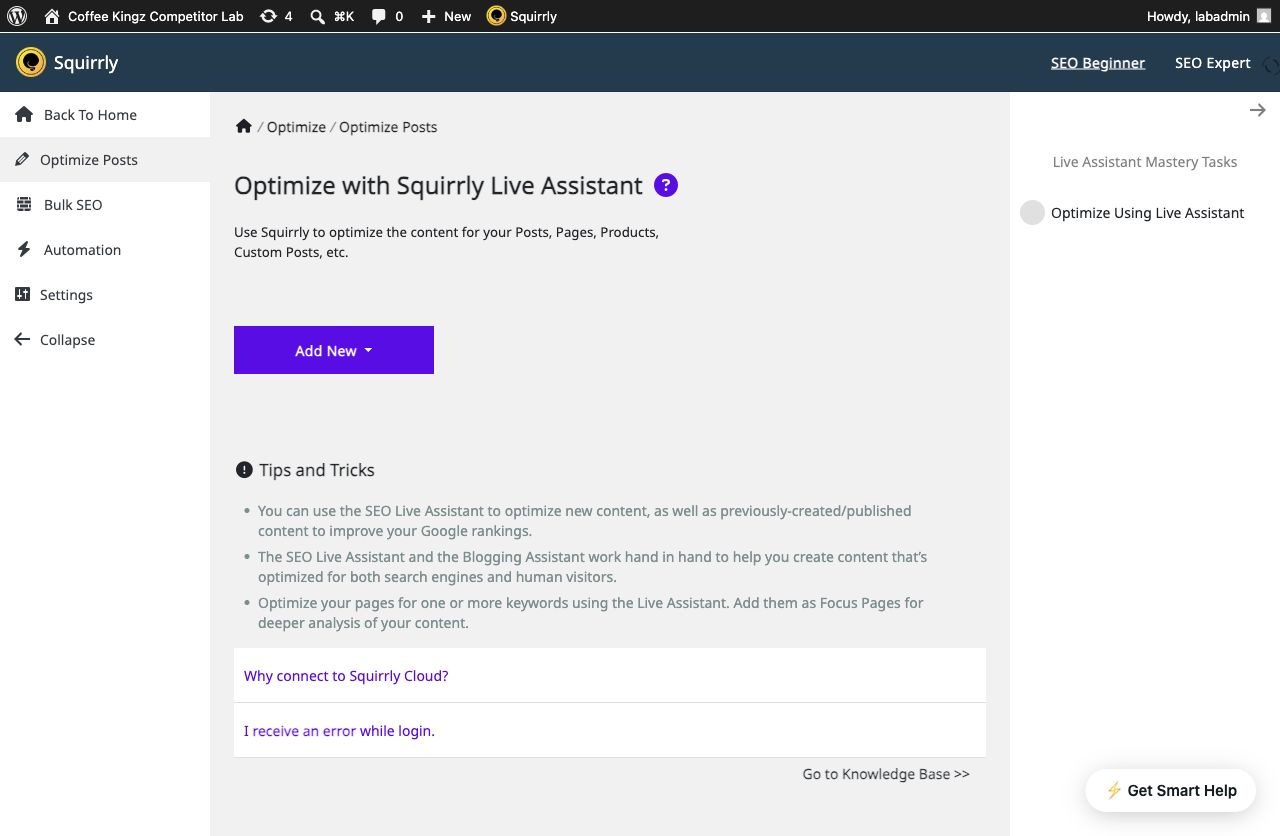
Squirrly GEO is the long-running Squirrly SEO suite with AEO and GEO added. It covers research, content help, Focus Pages, audits, rank tracking, schema, Search Console, Analytics, internal links and llms.txt.
It is much broader than a small AEO add-on.
Its GEO audit gives the user a real task list. It checks crawler rules, schema, short answers, question headings, lists, tables, depth and freshness.
These checks help prepare a page, but they don’t prove that an answer engine cited it.
Why choose Squirrly GEO instead of Xagio
Choose Squirrly GEO instead of Xagio when guided research, traditional SEO and GEO tasks need to live in one established suite.
Teams comparing audit workflows can use Content Health as a reference for page-level actions rather than a general readiness score.
What you give up
AI Visibility reads referrals from Google Analytics. It shows visits, traffic share, conversions and top sources.
It also shows a labelled estimate for wider AI exposure. The real referrals and the estimate should not be treated as the same evidence.
Choose Squirrly when you want guided SEO, research and GEO work in one mature system. Expect a Squirrly Cloud account for many key workflows.
A team that already likes its SEO plugin may prefer a smaller companion.
Pricing and setup
Broad SEO suite. The summary card shows the pricing published with this guide on 30 August 2026. Confirm the latest limits and billing terms in the official pricing before you buy.
Pros and trade-offs
- ✓Long product history and substantial public review sample
- ✓GEO audit and guided 14-day workflow
- ✓AI research, Focus Pages, internal-link rules and broad SEO tooling
- ✓Explicit distinction between referrals and unstable AI answer “rankings”
- ✗Much broader and more connected than a focused AEO companion
- ✗Several strategic areas require a Squirrly Cloud connection
- ✗No directly comparable saved-question four-engine answer-history interface was documented in the reviewed sources
GetGenie
Best for
GetGenie is best for research and AI-assisted writing.
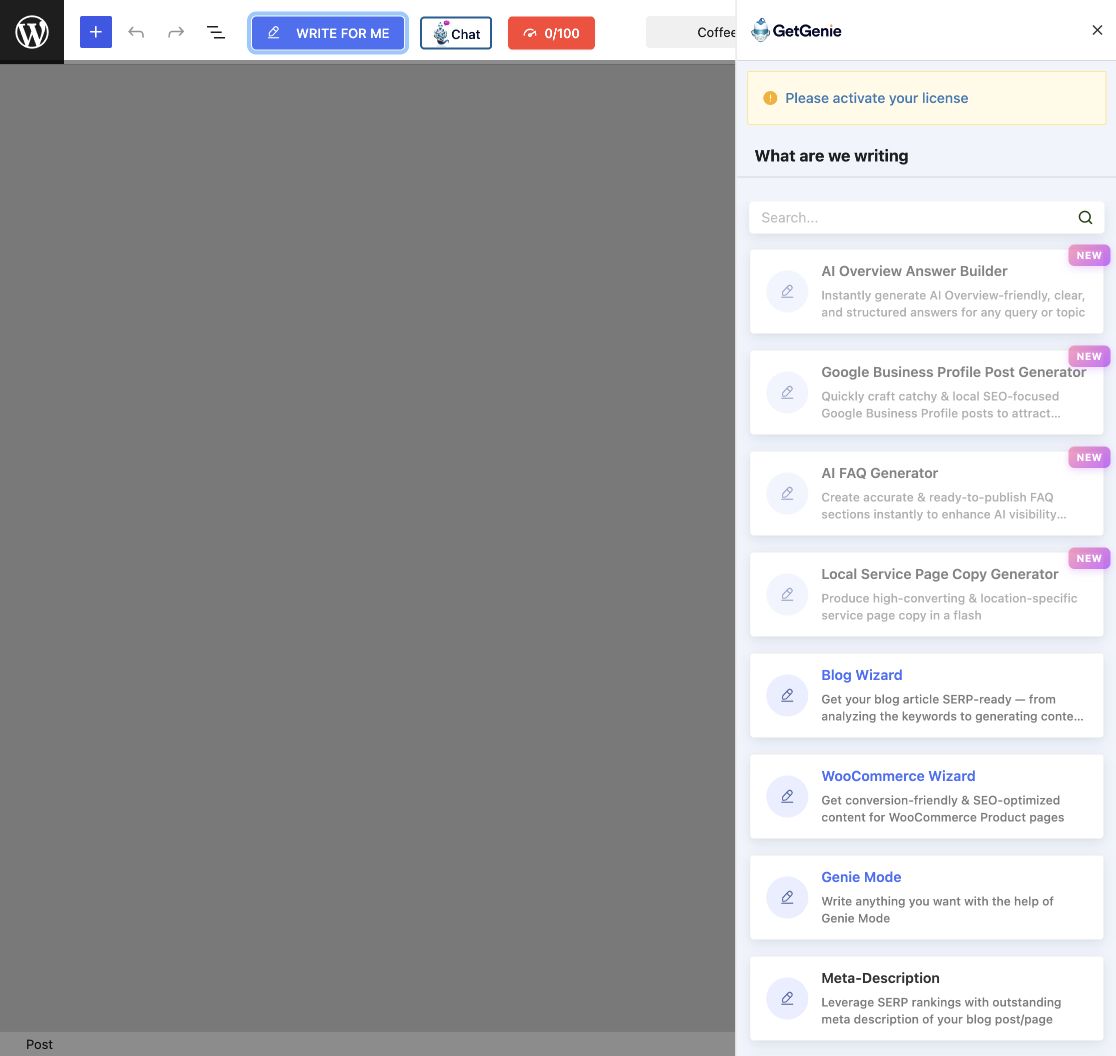
GetGenie is mainly a research and writing system. It offers keyword ideas, SERP and competitor research, topical maps, long-form writing, more than 40 templates, content scores, chat and images.
Calling it only an AI writer would miss much of the product.
Its tools sit inside the WordPress editor. A writer can move from research to an outline, short answer, article section, product copy or social post without changing screens.
Its Topical Map groups related topics and supports PNG and CSV export.
Why choose GetGenie instead of Xagio
Choose GetGenie instead of Xagio when keyword research and writing volume are the main bottlenecks for your content team.
For planning, compare its research flow with a Topical Map built around coverage gaps and the next page to create.
What you give up
SEO Insights includes Google data and AI referral traffic. Its AI Readiness score grades how content is prepared.
Neither is the same as running chosen questions across answer engines and saving the cited sources. We didn’t find that matching four-engine history in version 4.5.4.
Choose GetGenie when research and writing speed are the main problem. Plans limit words and research actions.
Choose a different tool when the site already has plenty of content but needs evidence, page actions or technical crawler records.
Pricing and setup
Writing and research tool. The summary card shows the pricing published with this guide on 30 August 2026. Confirm the latest limits and billing terms in the official pricing before you buy.
Pros and trade-offs
- ✓NLP keyword suggestions and head-to-head SERP research
- ✓Visual topical maps and more than 40 writing templates
- ✓AI Overview Answer Builder, FAQ generation and content scoring
- ✓WordPress editor integration, chat, images and WooCommerce use cases
- ✗Plans meter words, SERP analyses and other research allowances
- ✗No comparable controlled four-engine question history or Search Console URL-action workflow surfaced in 4.5.4
- ✗Its vendor-defined AI Readiness score is guidance, not proof of citations
Visibility

Best for
Visibility is best for a lightweight local SEO replacement.
Visibility is a small, free SEO/AEO plugin that keeps its main work on your site. It handles titles, page links, social tags, schema, index rules, sitemaps, redirects, llms.txt, Markdown and robots.txt.
Its listing says there is no Pro tier or product tracking.
The plugin has four areas: Discover, Indexing, Sitemaps and Redirects. It starts with safe defaults instead of changing every output at once.
There is no licence or vendor account step.
Why choose Visibility instead of Xagio
Choose Visibility instead of Xagio when you want a free local SEO replacement with no hosted account or paid plan.
Its local output is closest to the technical job handled by a Schema Engine and machine-readable site files.
What you give up
Visibility is honest about new standards. It says llms.txt use is still limited and no plugin can promise a citation.
The checked version didn’t include answer checks, AI visit reports, writing, link ideas or a Search Console data screen.
Choose Visibility when you want a free local SEO base and can replace your main SEO plugin. Don’t let two plugins control the same titles, schema or sitemaps.
Choose a companion when your current SEO setup should stay.
Pricing and setup
Replaces your SEO plugin. The summary card shows the pricing published with this guide on 30 August 2026. Confirm the latest limits and billing terms in the official product details before you buy.
Pros and trade-offs
- ✓Metadata, canonical/social output and several schema types
- ✓Indexing, native sitemap repair, redirects, robots, llms.txt and Markdown
- ✓No telemetry, custom database tables or cron documented
- ✓Migration tools for major SEO plugins and candid limits around llms.txt/citations
- ✗It is intended to replace the main SEO plugin
- ✗No citation tracker, AI-referral platform or Search Console data dashboard is documented
- ✗Deliberately doesn’t provide connected AI generation or ongoing cloud analysis
Choose by the job you need
Prioritise citation evidence and page action
AEO God Mode fits evidence-to-action AEO.
Prioritise research and writing
GetGenie fits research and AI-assisted writing.
Replace or broaden the SEO stack
ThinkRank fits a full SEO migration with MCP control. Squirrly GEO fits guided all-in-one SEO and GEO. Visibility fits a lightweight local SEO replacement. Xagio fits agency SEO, websites and hosting.
Test your shortlist before you switch
Use the same small test for every product. This gives you a fair result without turning the article into a giant checklist.
Do this on a safe test site. Keep the same notes for every tool.
Your final choice should make the weekly job feel clear.
Make the reason easy to state. Make the limits easy to accept.
Keep the proof clear. Keep the cost clear.
Save each result. Note who must act. Record what can fail. Add each new bill. Check what you keep if you leave.
Count the steps. Time the task. Keep the notes.
- Pick one real page and one real question.
- Record the proof the tool finds and the action it suggests.
- Check what leaves WordPress and what remains after disconnecting.
- Add the plugin, provider and staff costs for your normal volume.
- Let the person doing the weekly work judge the final result.
A Content Health review can supply the page for the test. Link Health can show whether the tool separates broken links from working links. Keep replacement plugins on a safe copy until titles, schema and sitemaps are checked.
Check the full cost
Prices appear in each product card. Add provider bills, staff time and any larger plan needed for history or more sites. Hosted tools may also process data away from WordPress.
Use the current plans to check AEO God Mode limits against the volume you tested. Recheck every vendor page before buying because prices and allowances can change.
Our recommendation
Choose or keep Xagio when you need agency SEO, websites and hosting. Don’t replace a working tool for a longer menu.
Choose AEO God Mode when your SEO setup already works but your team needs a clear path from evidence to action. Choose another option when you need a full SEO replacement, managed automation, high-volume writing or a small local tool.
The best option gives you proof you trust. It should also help your team finish the next task.
Frequently asked questions
Yes. Version 7.1.0.43 remained a sound choice for agency SEO, websites and hosting. Other products solve other jobs. That doesn’t make Xagio weak.
The closest match depends on the job. AEO God Mode fits evidence-to-action AEO. ThinkRank fits a full SEO migration with MCP control. Squirrly GEO fits guided all-in-one SEO and GEO.
Not for a companion tool. A replacement needs a planned move. Never let two plugins create the same titles, schema or sitemaps by mistake.
No. llms.txt is a voluntary file for AI tools. It may publish guidance or a content map. It can’t force access, use or a citation. Treat any citation promise as a warning sign.
No. Referral tracking records visits that clicked through. Citation tracking checks answers for named sources. A cited result may get no visit. A referral may come from a different question.
Sometimes. Your own key removes the plugin credit meter. You still manage bills, limits, key safety and provider errors. Credits make setup easier but have an allowance. Compare real monthly use and staff time.
No. A plugin can improve access, structure, facts and workflow. It can also record answers and referrals. Each answer engine still chooses its own sources.
Methodology and official sources
Facts checked: 26 August 2026. We used WordPress.org records, product pages, prices and guides. We also checked visible workflows in clean WordPress sites. We didn’t guess what a locked paid tool might do. Screenshots show the real products.
| Product | Official sources checked |
|---|---|
| Xagio | WordPress.org listing · Product overview · Pricing |
| AEO God Mode | WordPress.org listing · Product overview · Pricing · Credit guide |
| ThinkRank | WordPress.org listing · Product overview · Pricing |
| Squirrly GEO | WordPress.org listing · Plugin overview · Pricing · GEO product page |
| GetGenie | WordPress.org listing · Product overview · Pricing |
| Visibility | WordPress.org listing · Product overview |
Product names and logos belong to their respective owners. AEO God Mode is not affiliated with Xagio or the other vendors named here.