The Citability Score is a report card for each article on your site. It checks one thing: how easy is this page for an AI tool, like ChatGPT, to quote? Every article gets a score from 0 to 100 and a grade from A to F. The page then tells you exactly what to change, and it can make the biggest change for you.

What does the score mean?
The score is out of 100. The grade tells you at a glance how a page is doing.
- A (85 or more): easy for AI to quote.
- B (70 or more): good, with a few things to add.
- C (50 or more): worth fixing soon.
- D (30 or more): needs work.
- F (under 30): starts with the basics.
Click any colour in the grade bar to see only those pages.
What are the 8 checks?
Each article is checked for 8 things. Each one is worth some points, and together they add up to 100.
| Check | What it wants | Points |
|---|---|---|
| Questions answered straight away | Under a question heading, the first sentence gives the answer. For “How long do beans stay fresh?”, start with “Beans stay fresh for about 2 to 4 weeks.” | 25 |
| Concrete figures | Real numbers, like prices, percentages or how long something takes. About one for every 300 words. | 15 |
| Clear headings | At least two headings, and at least one written as a question. | 10 |
| Clear statements | Plain sentences like “A flat white is a small, strong milk coffee.” Fewer “might” and “maybe”. | 10 |
| Short quotable lines | Short sentences that make sense on their own. | 10 |
| Sources linked | Links to other trusted websites that back up your facts. | 10 |
| Enough depth | Around 1,000 words or more. | 10 |
| FAQ section | A few questions with short answers, usually near the end. | 10 |
Every page can reach 100. Hover over any check name in the plugin for a reminder of what it wants.
Where should I start?
The list opens on Biggest wins. These are the pages with the most points missing, so they are the best place to start.
Click any page to open it. You will see all 8 checks, with a tick for each one it passes and a short to-do for each one it misses. The number in brackets is how many points that to-do is worth.
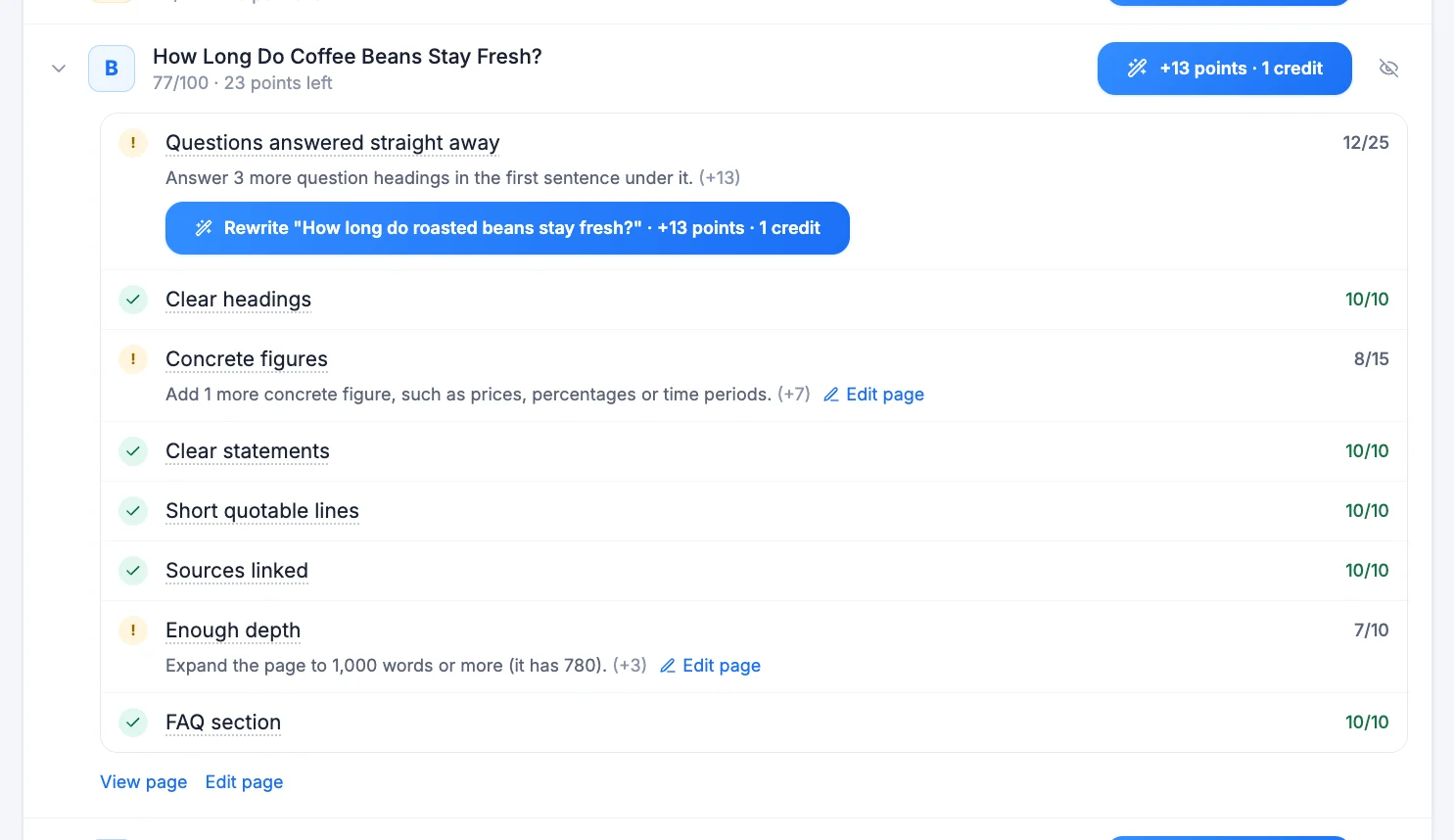
How does the Fix button work?
The biggest check, Questions answered straight away, can be fixed for you.
- Click Fix next to a page. The button shows how many points it will add.
- The AI writes a new first sentence that answers the heading.
- You see the old text (Before) and the new text (After).
- Click Apply to page to use it, or Discard to throw it away.

- Cost: 1 AI credit per fix.
- If the AI cannot write a good answer, you are not charged.
- If the old text had a link, the preview warns you, so you can add it back in the editor.
- After you apply, the page is scored again straight away.
What is Fix my top 10?
It does the same thing for your 10 best opportunities at once. It shows how many pages, how many points you could gain, and the most it can cost before it starts.

A progress bar shows each answer being written. When it finishes, you read every answer, untick any you do not want, and click Apply selected. You are only charged for answers that pass.
Why are some pages skipped?
Some pages are not articles, like your privacy policy, a thank-you page or a very short contact page. They would always score low and pull your average down, so they are left out. You can see them, and why they were skipped, under Skipped.

To leave out any other page, click the eye icon on its row. You can bring it back from Excluded at any time.
What the score does not tell you
The Citability Score measures how your page is written. It does not show whether ChatGPT or Perplexity has actually quoted you yet. To see real mentions, use Citation Tracking.
Frequently asked questions
Why did my score change after I updated the plugin?
The checks were updated to be clearer and fairer. Click Re-scan once after updating to see your new scores.
Can every page get 100?
Yes. Each to-do shows exactly what is missing, and doing all of them gets a page to 100.
Do I pay if a fix does not work?
No. You are only charged 1 credit when the AI writes an answer that passes.
Does structured data (schema) change my score?
No. Structured data helps with Google search results, but it is not part of this score.