


Squirrly GEO and AEO God Mode solve different parts of WordPress AEO. Neither is the right choice for every site.
The decision is a focused companion for evidence and action versus an established guided SEO and GEO suite. Start with that operating choice before you count features.
The short answer
| Product | Best fit | Product shape | Evidence emphasised |
|---|---|---|---|
| Squirrly GEO | guided all-in-one SEO and GEO | Broad SEO suite | audits, research, crawlers and referrals |
| AEO God Mode | evidence-to-action AEO | Works beside your SEO plugin | citations, Search Console, crawlers and referrals |
Keep Squirrly GEO when its product shape matches the job. Choose AEO God Mode when the present SEO setup already works and the missing layer is evidence, page decisions and follow-through.
The Squirrly GEO alternatives guide compares it with a wider shortlist. The AEO tools and comparisons archive keeps each decision guide in one place.
How the products fit WordPress
Squirrly GEO and AEO God Mode have a similar place in a WordPress stack. The real choice is how each one fits the team’s weekly work.
Squirrly GEO mainly shows audits, research, crawlers and referrals. AEO God Mode mainly shows citations, Search Console, crawlers and referrals. Decide which proof your team will use. Then check what you can do with it.
Choose Squirrly GEO for guided all-in-one SEO and GEO. Choose AEO God Mode for evidence-to-action AEO. Test one weekly job. Find proof, choose a page, approve a change and check the result.
If you need more control over technical output, compare how each product handles structured data and machine-readable publishing. These foundations matter, but neither proves that an answer engine cited the page.
Squirrly GEO
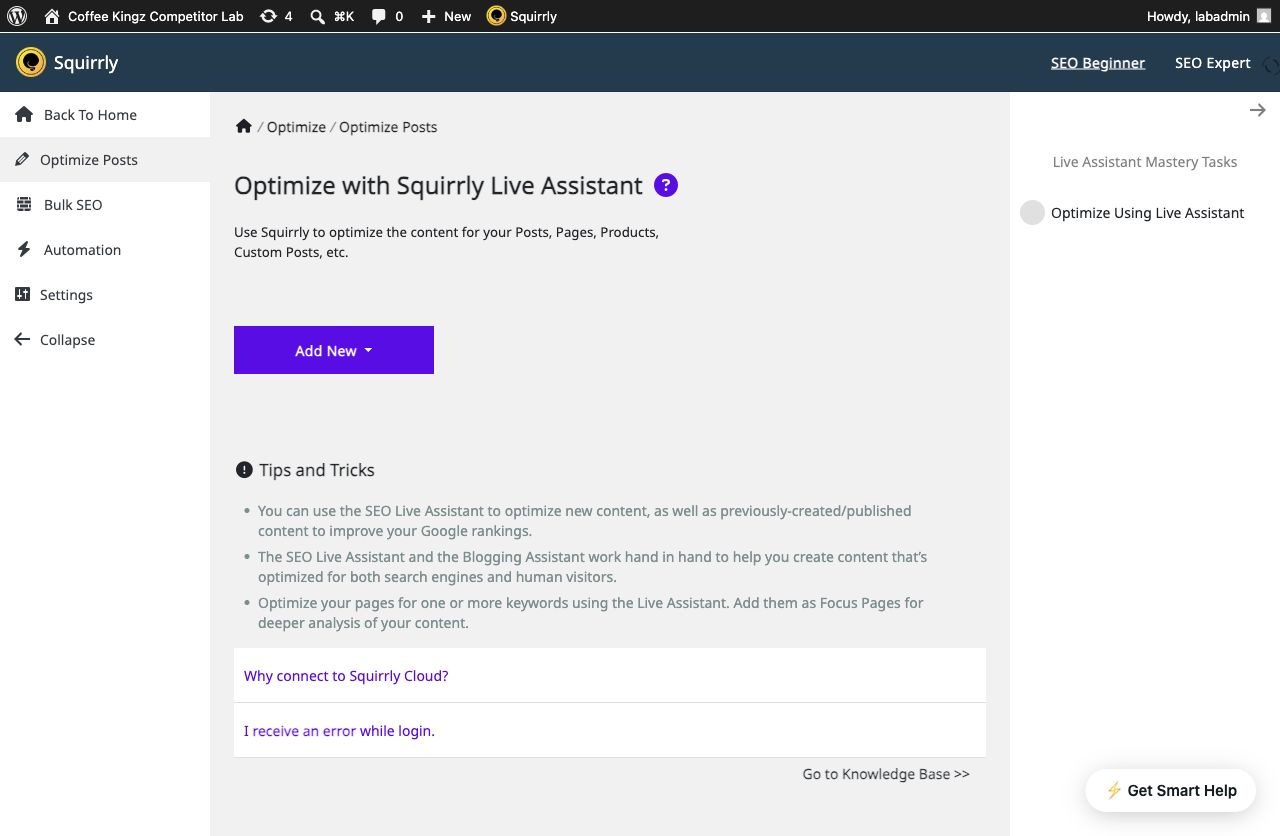
Best for: guided all-in-one SEO and GEO.
What Squirrly GEO covers
Squirrly GEO is the long-running Squirrly SEO suite with AEO and GEO added. It covers research, content help, Focus Pages, audits, rank tracking, schema, Search Console, Analytics, internal links and llms.txt.
It is much broader than a small AEO add-on.
How the workflow works
Its GEO audit gives the user a real task list. It checks crawler rules, schema, short answers, question headings, lists, tables, depth and freshness.
These checks help prepare a page, but they don’t prove that an answer engine cited it.
What to understand before choosing
AI Visibility reads referrals from Google Analytics. It shows visits, traffic share, conversions and top sources.
It also shows a labelled estimate for wider AI exposure. The real referrals and the estimate should not be treated as the same evidence.
Best fit and trade-offs
Choose Squirrly when you want guided SEO, research and GEO work in one mature system. Expect a Squirrly Cloud account for many key workflows.
A team that already likes its SEO plugin may prefer a smaller companion.
Pros and trade-offs
- ✓Long product history and substantial public review sample
- ✓GEO audit and guided 14-day workflow
- ✓AI research, Focus Pages, internal-link rules and broad SEO tooling
- ✓Explicit distinction between referrals and unstable AI answer “rankings”
- ✗Much broader and more connected than a focused AEO companion
- ✗Several strategic areas require a Squirrly Cloud connection
- ✗No directly comparable saved-question four-engine answer-history interface was documented in the reviewed sources
AEO God Mode
 AEO God Mode
Best for: evidence-to-action AEO.
What AEO God Mode covers
AEO God Mode starts with three simple questions. What do we know?
What should we change? Did the change help?
It keeps each kind of proof separate, so the numbers stay honest. Search Console, crawler visits, AI referrals, indexed mentions and direct answer checks all tell you something different.
How the workflow works
The useful part is what happens next. If a tracked question misses your site, you can find the page to improve, plan a new page, study the sources that were cited or add a useful internal link.
Smart Internal Linking finds strong source passages across your site. You review every suggestion before it changes a post.
Topical Map groups real gaps into a clear publishing plan instead of handing you a loose keyword list.
What to understand before choosing
The AEO God Mode writing tools go far beyond schema and llms.txt. The Knowledge Base can ground a draft in facts you supplied.
The Repurpose Content feature turns one approved post into editable YouTube, X and LinkedIn material. Visual Content Blocks turn useful facts into native WordPress blocks.
Crawler controls, logs, llms.txt and schema checks are still included, but they support the wider find-it, fix-it and measure-it workflow.
Best fit and trade-offs
Some AEO God Mode AI tasks use monthly plan credits. You can also use your own provider keys for parts of Citation Tracker.
This is easier for people who don’t want to set up several AI accounts. A very high-volume team should still compare the plan allowance with the cost and upkeep of using its own keys.
No plugin can promise citations. AEO God Mode helps you do better work and record what happened.
Pros and trade-offs
- ✓Selected-question Citation Tracker across supported answer engines
- ✓Google Search Console query, page and indexing workflows
- ✓Smart Internal Linking, Content Health, Link Health and Answer Density
- ✓Knowledge-Base-grounded drafting, topical planning, repurposing and native content blocks
- ✗Some AI actions consume finite monthly plan credits
- ✗Pro is licensed per site and Growth is required for broader market/indexed-mention workflows
- ✗It complements rather than replaces a traditional SEO plugin

Where the weekly workflows differ
Begin with the proof you need
Squirrly GEO mainly shows audits, research, crawlers and referrals. AEO God Mode keeps Search Console, crawler visits, referrals, indexed mentions and returned-answer checks separate. Decide which event must be visible before you choose a dashboard.
The AI Crawler Log records recognised bot requests without calling them citations. The Citation Tracker records returned sources for selected questions. The Search Console workflow connects query and indexing evidence to page actions.
Follow the result into WordPress
A report has value when the team knows what to do next. Ask whether the result points to an owned page, a missing page, an outside source or a technical setting. Then test whether an editor can complete the action without losing the evidence that prompted it.
Smart Internal Linking finds relevant source passages for editorial approval. Content Health identifies weak and stale pages, while Answer Density finds sections that delay the answer.
Check the account and data model
List every account, provider key and hosted service the workflow needs. Find out which records remain in WordPress. Check what stops if a connected account is cancelled. This matters as much as the visible feature list.
Don’t treat local as automatically better or a hosted service as automatically easier. A managed service can remove upkeep. A local workflow can give the editorial team more control. Choose the responsibility your team can sustain.
Test both products on real work
Start with one page and question
Pick a published page that matters to the business. Choose one question a buyer genuinely asks. Record the present answer, cited sources, Search Console position and useful internal links before the test.
If the page is already weak, begin with a Content Health review. Use the Content Gap Scanner when no suitable page answers the question.
Protect the live SEO setup
Use a safe copy of the site for any product that can create titles, schema, sitemaps, redirects or robots rules. Record which plugin owns each output. Keep a backup and a clear rollback path.
The Schema Validator shows the markup WordPress actually publishes. Check it before and after the test rather than relying on a settings toggle.
Complete the whole task
Don’t stop when a score or chart appears. Find the page, inspect the evidence, approve the change and save the result. Count manual hand-offs and copy-and-paste work.
The Topical Map turns coverage gaps into a publishing plan. Link Health separates broken links from links that still work. These are different jobs, so test the one your team actually needs.
Repeat the check
Run the same question again later. A single answer is a sample, not a rank. Save enough context to understand whether the source changed and whether your edit had a plausible effect.
Run a seven-day comparison
Day one: name the owner
Choose the person who will use the product each week. That may be an editor, SEO lead, site owner or agency worker. Give that person the deciding voice on workflow. A buyer who only sees the feature list may miss daily friction.
Write down who owns titles, schema, sitemaps, content changes and reporting today. Squirrly GEO is a mature connected all-in-one seo and geo suite. AEO God Mode is a companion operations layer. That difference changes which existing responsibilities move and which stay in place.
Day two: record a baseline
Save the current page, query and answer before you change anything. Note crawler visits, referrals and Search Console data when they exist. Take a copy of the returned answer and its cited sources. This gives both products the same starting point.
Don’t turn a readiness score into a citation baseline. The events are different. Squirrly GEO mainly reports audits, research, crawlers and referrals. AEO God Mode separates several evidence types. Judge each product against the event it truly records.
Day three: inspect setup work
Time the first useful setup, not only the install. Include account creation, keys, consent, site scans and any migration. Record each external service. A short install can still lead to a long setup when several accounts need attention.
Check the default state before you enable output. Look at schema, robots rules, sitemaps and machine-readable files. If a product replaces SEO output, confirm that the old owner is disabled. If it works beside the SEO plugin, confirm that it stays in its lane.
Day four: find one piece of proof
Use the same question and page in each product. Find the evidence without reading a help guide first. Clear labels matter because crawler activity, referrals and answer citations can look similar to a new user even though they prove different events.
Save enough detail for another editor to understand the result. A green score alone is hard to audit. A useful record names the question, engine, page, source, time and method. It should also explain any estimate or vendor score.
Use the Citation Tracker when returned sources are the proof you need. Use the crawler or referral view when that is the event being tested.
Day five: finish an action
Take the evidence into a real task. Improve a section, add a link, plan a page or fix a technical setting. Count how many screens and tools the job crosses. Note where context is lost or copied by hand.
Use Smart Internal Linking when the next action is a contextual link. Keep the source passage visible so the editor can judge the suggestion.
Squirrly GEO is strongest for guided all-in-one SEO and GEO. AEO God Mode is strongest when evidence should lead to an owned page and a guided WordPress action. This step often decides the comparison more clearly than the feature table.
Day six: hand the work to a colleague
Ask another user to read the saved result and continue the task. Don’t explain the interface first. Watch for unclear labels, private history, missing permissions and steps that only the original tester understands.
Check whether the history belongs to the whole site or one account. An agency may need more site access. An editorial team may need shared notes and review. Include those needs in the plan cost rather than treating them as a later problem.
Day seven: repeat and decide
Run the check again and compare it with the baseline. Confirm that saved history still makes sense. If an upstream provider fails, inspect the error. A product should tell you whether the problem is a key, quota, credit limit or remote service.
Score the finished task, not the number of menus. Record setup time, proof found, action completed, review effort and total cost. Keep Squirrly GEO if its model fits the team. Choose AEO God Mode if its joined evidence and action loop removes more work.
Check long-term editorial fit
Review before applying changes
Decide which actions can be automatic and which need a person. A safe content workflow keeps source facts and the proposed edit visible. The editor should know what will change before a live page is updated.
Hosted automation can save time when the team trusts the rules and review path. Local tools can make ownership clearer. Neither choice removes the need for factual review. Generated content still needs a named editor and a source of truth.
Test failure states
Disconnect an optional account on a safe test site. Remove a test key or use a low quota. Check whether the product fails clearly and leaves the site usable. A silent empty report is harder to diagnose than an honest error.
Find out what happens to scheduled work when a provider is unavailable. Check retries and duplicate protection. A weekly workflow should not spend twice or publish twice because the first response arrived late.
Check data portability
Ask which records can be exported. Saved questions, answers, page choices and approved actions may become useful business history. A dashboard is less valuable when all context disappears after a plan change.
Check what remains in WordPress after a connected service is removed. Keep a copy of any data the team would need for review or compliance. Don’t assume that cancelling a plan and deleting stored data are the same action.
Price the maintenance
Count monthly checks, generated items and active sites. Add staff time for provider keys, failed calls and review. A bring-your-own-key model moves cost and upkeep to the owner. A credit plan bundles more of that work but sets an allowance.
Use a quiet month and a busy month in the estimate. Check whether unused allowance rolls over and whether a sudden campaign needs a larger plan. The fairest price is the cost of the workflow at real volume.
Define success after thirty days
Choose one result the team can inspect. It may be clearer page priorities, fewer manual hand-offs, stronger internal links or better records of selected answer checks. Avoid a goal that depends on an engine you can’t control.
Review the result with the person who approves the budget. Show the saved evidence, the action and the time required. A product earns its place when the team can explain the work it improved and the limits it still has.
Keep a plain test log
Write one short note after each test. Name the page, task, time and result. Add the cost when a check used a key or plan credit. Plain notes make it easy to compare both tools at the end of the week.
Keep links to the page and saved proof in the same note. Don’t rely on a screen that may change after the next run. A clear log helps a second user check the choice and spot a gap in the test.
Ask what the tool replaces
List each old tool or manual step that could stop. Don’t count a feature as a saving if the team must still keep the old bill. Check this with the person who does the work, not just the person who pays.
A focused add-on may leave more tools in place but cost less to move. A broad suite may replace more bills but need more setup. Use the full stack in the sum. This keeps the price choice fair.
Plan the first month
Pick three tasks for the first month. Give each task an owner and due date. Keep the list small enough to finish. A long launch list can make a good tool feel hard before the team learns the main flow.
Review the plan after two weeks. Remove work that has no clear proof or next step. Add a task only when the team knows why it matters. This keeps the product tied to real site work rather than new menu items.
Keep the final choice easy to explain. Write down why the chosen tool fits the task, who owns the work and what the team will check next month. Save that note with the test log. Share it with each person who will use the product before the first month begins. Ask them to flag any task, cost or risk the test missed.
Know what the evidence proves
Crawler activity proves that a known bot requested a URL. Referral data proves that a person clicked from an AI product. Search Console shows Google Search and index data. A direct answer check records what one engine returned for one selected question at that time.
Readiness scores grade the rules chosen by the product. They can guide work, but they can’t force an independent answer engine to cite a page. Keep these signals separate when you judge either product.
Compare the full cost
Squirrly GEO, checked 26 August 2026: Free. current main table observed Pro at $9.99/month, Web Dev Kit $51.20/month and Business $71.99/month. older/exclusive pages showed different figures.
AEO God Mode, checked 26 August 2026: Free. Pro $19 per month billed annually for one site and 500 monthly credits. Growth $49 per month billed annually for five sites and 1,500 credits.
Add provider charges, hosted-service limits and staff time. A free plugin may still need paid AI keys. A larger plan may be fair when it replaces other tools. Use the plan comparison to check current features, site limits and monthly credits against the volume you tested.
Our recommendation
Choose Squirrly GEO when you need guided all-in-one SEO and GEO. Its strongest case is its own operating model, not a claim that every WordPress site needs the same stack.
Choose AEO God Mode when you want to keep the current SEO plugin and add selected-question evidence, Search Console prioritisation, page health, internal links and guided editorial work. It is a companion, not a replacement SEO suite.
The winner is the product that fits the task your team will repeat. Test that task, confirm the evidence and price the whole workflow.
Frequently asked questions
Sometimes. Companion tools can share a site when they don’t create the same output. If Squirrly GEO owns titles, schema or sitemaps, disable overlapping output elsewhere and test the rendered page.
AEO God Mode is built around saved selected-question checks and connected page actions. Squirrly GEO emphasises audits, research, crawlers and referrals. Compare the exact event recorded, not the dashboard label.
A companion is usually easier because the current SEO plugin can remain in charge. A replacement can still be the right decision, but it needs migration testing and one clear owner for each SEO output.
That depends on the product and action. Some tools use your keys, some include credits and some call a hosted service. Check key storage, provider bills, quotas and failure handling before you commit.
No. A plugin can improve access, structure, facts and workflow. It can also record answers and referrals. Each answer engine still chooses its own sources.
Price matters after scope. Include the plugin, AI providers, connected services and staff time. The cheaper sticker price may require more upkeep or leave another paid job uncovered.
Methodology and official sources
Facts checked: 26 August 2026. We used official WordPress.org records, product pages, prices and guides. We also reviewed the visible WordPress workflows. We didn’t guess what a locked feature might do.
| Product | Official sources checked |
|---|---|
| Squirrly GEO | WordPress.org listing · Plugin overview · Pricing · GEO product page |
| AEO God Mode | WordPress.org listing · Product overview · Pricing · Credit guide |
Product names and logos belong to their owners. AEO God Mode is not affiliated with Squirrly GEO.