
- Kaldia generates schema using OpenAI’s API for FAQ, HowTo, Event, and Product types
- AEO God Mode covers the full AI visibility stack with zero API dependencies
- Kaldia only works on WordPress pages, not posts, products, or custom post types
- AEO God Mode generates schema locally, tracks AI crawlers, creates llms.txt, and verifies citations
- Both plugins are free to install, but Kaldia requires a paid OpenAI API key
- AEO God Mode Pro adds citation tracking, AI referral analytics, and citability scoring
Two WordPress plugins in the repository claim to handle answer engine optimization. They take very different approaches to the same problem.
Kaldia AEO Manager focuses on one job: AI-generated schema markup. AEO God Mode takes a broader approach, covering everything from crawler tracking to citation verification.
If you’re deciding between the two, this comparison breaks down exactly what each plugin does, where each one shines, and where the gaps are. No hype, no fluff, just the facts based on publicly documented features and hands-on testing.
What Kaldia AEO Manager Does
Kaldia version 1.0.5 is a free WordPress plugin from a small development team. The name stands for “Knowledge and Language-Driven Intent Answers.” Its sole purpose: use the OpenAI API to generate JSON-LD structured data and inject it into your page head.
You pick a page. You choose a schema type. You click generate. The plugin sends your content to OpenAI, gets back JSON-LD, and injects it into your HTML. Simple, clean, focused.
The OpenAI Integration
Kaldia requires an OpenAI API key to function. You create an OpenAI account, generate a key, and paste it into plugin settings.
The plugin includes a solid security detail worth noting. API keys are stored using AES-256-CBC encryption, which protects your credentials from database breaches. This is better security than most WordPress plugins offer.
You can choose between four OpenAI models: gpt-4o, gpt-4, gpt-4o-mini, and gpt-3.5-turbo. Temperature and max token controls let you fine-tune the AI output per generation.
When you click generate, the plugin extracts your content into separate pieces: headings, paragraphs, list items, and plain text. Each piece gets its own slot in a prompt template stored as a PHP file. This granular extraction gives the AI model better context and usually produces more relevant schema output than sending raw text.
Supported Schema Types
Kaldia supports four schema types:
- FAQ (FAQPage)
- HowTo (HowTo)
- Event (Event)
- Product (Product)
The Event schema support is worth noting. Not many AEO tools cover events right now. If you run a venue, conference, or local events site, this is a genuine advantage Kaldia brings to the table.
Where Kaldia Falls Short
Kaldia only works on standard WordPress pages.
Blog posts, custom post types, and WooCommerce products are not supported. For most content-driven websites, blog posts drive the majority of organic traffic. This limitation means Kaldia can’t touch your most important content.
Schema generation is manual. You open each page, click generate, review the output, and save. Every regeneration costs API tokens. For a 200-page site, that adds up.
The plugin also lacks validation against Google’s schema requirements, conflict detection with other SEO plugins, and any form of analytics.
- ✓AES-256-CBC encrypted API key storage
- ✓Smart per-element content extraction for better AI context
- ✓Event schema support
- ✓Built-in JSON-LD editor with basic validation
- ✓Multiple OpenAI model options with temperature control
- ✗Only works on WordPress pages, ignores posts and products
- ✗Requires paid OpenAI API key with ongoing token costs
- ✗Manual generation required for each page
- ✗No conflict detection with Yoast or Rank Math
- ✗No crawler tracking, llms.txt, or analytics
What AEO God Mode Does
AEO God Mode takes a different approach. Instead of focusing on one task, the plugin covers the full range of signals that AI engines use when deciding which sites to crawl, read, and cite.
It doesn’t replace your SEO plugin. It detects Yoast or Rank Math on install, imports relevant settings, and only adds features they don’t cover. Title tags, meta descriptions, and canonical URLs stay exactly as they are.
Free Features (No API Key Needed)
Schema Engine. Generates JSON-LD for 8 types locally on your server. Article, FAQPage, HowTo, LocalBusiness, Organization, Product, BreadcrumbList, and WebSite. The engine auto-detects your content type and injects the right markup. No API calls. No per-page costs. Works on posts, pages, custom post types, and WooCommerce products.
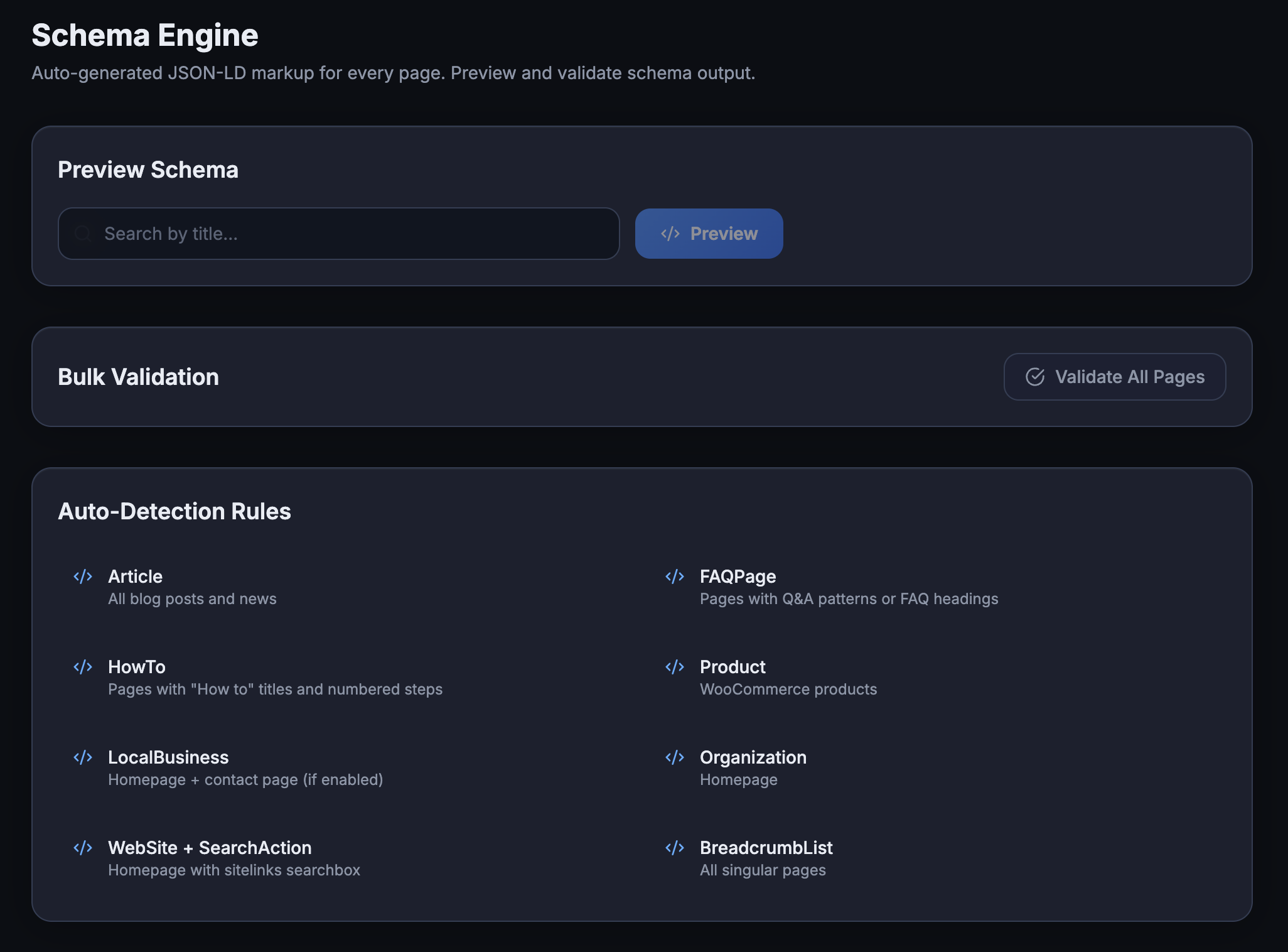
Auto-detection is the key difference here. AEO God Mode reads your content structure: if it finds question-and-answer patterns (in any of 8 formats including Yoast FAQ blocks, Rank Math blocks, HTML5 details/summary, or plain Q&A text), it generates FAQPage schema automatically. HowTo detection works similarly for numbered step content.
AI Crawler Logging. Detects and logs 14 AI crawler patterns: GPTBot, ChatGPT-User, PerplexityBot, ClaudeBot, anthropic-ai, Google-Extended, Applebot, Amazonbot, Bytespider, CCBot, FacebookBot, meta-externalagent, cohere-ai, and DeepSeekBot.
Each visit records the bot name, IP address, page URL, timestamp, and HTTP response code. The dashboard shows per-bot counts, the top 20 most-visited pages, daily trends, and 7/30 day summaries. A daily cron auto-purges entries older than 90 days.
This matters because you can’t optimize for engines that aren’t visiting.
llms.txt Generation. Follows the official llmstxt.org spec proposed by Jeremy Howard. The file tells language models what your site covers and which pages matter most. It breaks into sections: Core Pages, Services/Products, Guides (top posts by engagement), FAQs, and Optional content. Auto-generated and cached with a 24-hour refresh. Users can also edit a free-form context section from the dashboard.
Content Gap Scanner. Audits every published page for missing AEO signals: no schema, no FAQ content, no direct-answer structure after H2 headings, missing outbound source links. Returns a prioritized action list with one-click fixes.
Schema Validator. Checks output against Google’s requirements. Pass, warning, or fail per page, right in the dashboard.
Conflict Detector. Scans for existing schema output from Yoast, Rank Math, and other plugins before activating any type. When a conflict is found, the plugin defers. You can also manually assign which types each plugin handles.
Robots.txt Manager and AI HTTP Headers. Dashboard controls for allowing or blocking specific AI bots. HTTP headers communicate crawl preferences before page content loads.
Setup Wizard. Five screens. Auto-detects your SEO plugin, imports business info, configures modules. Under five minutes from install to running.
Pro Features ($99/year for 5 Sites)
Citation Tracker. The standout Pro feature. Queries Perplexity, ChatGPT, Gemini, and Claude with prompts generated from your site’s categories and top content. Checks if your domain appears in the response. Stores up to 500 results with 90-day history. Runs on a scheduled cron twice daily. API keys are encrypted with AES-256-CBC.
AI Referral Traffic. Tracks visitors arriving from chatgpt.com, perplexity.ai, gemini.google.com, claude.ai, and other AI platforms. Privacy-safe: IP addresses are SHA-256 hashed with WordPress salts, never stored raw. Shows per-source breakdowns, daily trends, and top landing pages.
Citability Score. A 0-100 per-page grade predicting how likely AI engines are to cite your content. Based on 10 signals: direct answers (15 pts), original data (15 pts), definitive claims (10 pts), heading clarity (10 pts), quotable sentences (10 pts), source links (10 pts), author attribution (10 pts), content depth (10 pts), FAQ presence (5 pts), and valid schema (5 pts). Grades run A through F with specific improvement tips.
E-E-A-T Schema Enrichment. Generates Person schema for post authors with custom fields: job title, credentials, education, expertise areas, social profiles. Per-field display toggles with live preview. Author cards appended after posts.
Google Search Console Integration. Full OAuth 2.0 connection. Pulls per-page indexing status, impressions, clicks, and crawl data directly into your AEO dashboard.
Side-by-Side Feature Comparison
| Feature | Kaldia AEO Manager | AEO God Mode Free | AEO God Mode Pro |
|---|---|---|---|
| Schema Generation | OpenAI API (manual) | Local auto-detect | Local auto-detect |
| API Key Required | Yes (OpenAI, paid) | No | No |
| Schema Types | 4 | 8 | 8 + E-E-A-T |
| Event Schema | Yes | No | No |
| Posts Support | No | Yes | Yes |
| Pages Support | Yes | Yes | Yes |
| CPT Support | No | Yes | Yes |
| WooCommerce | No | Yes | Yes |
| AI Crawler Log | No | Yes (14 bots) | Yes (14 bots) |
| llms.txt | No | Yes | Yes |
| Schema Validation | Basic JSON check | Google standards | Google standards |
| Content Gap Scanner | No | Yes | Yes |
| Conflict Detection | No | Yes | Yes |
| Robots.txt Manager | No | Yes | Yes |
| Setup Wizard | No | Yes | Yes |
| Citation Tracking | No | No | Yes (4 engines) |
| AI Referral Traffic | No | No | Yes |
| Citability Scoring | No | No | Yes (10 signals) |
| E-E-A-T Enrichment | No | No | Yes |
| GSC Integration | No | No | Yes |
The Pricing Picture
| Kaldia | AEO God Mode Free | AEO God Mode Pro | |
|---|---|---|---|
| Plugin Cost | Free | Free | $99/year |
| API Costs | OpenAI tokens (~$0.01-0.10/page) | None | None |
| Sites | 1 | Unlimited | 5 |
| 200-Page Cost | $2-20 in API fees | $0 | $99/year flat |
Kaldia is technically free, but the OpenAI dependency means you’re paying per generation. A basic FAQ schema on gpt-4o-mini costs a few cents. Using gpt-4o across a large site raises that bill quickly. And every time you update a page and regenerate, you pay again.
AEO God Mode’s free version includes all 12 modules with zero external costs. The Pro upgrade adds analytics and citation tracking at a flat yearly rate.
For comparison, Yoast Premium runs $99/year for one site. AIOSEO starts at $99.50/year for one site. Neither includes AI-specific features.
Where Each Plugin Actually Shines
Give credit where it’s earned. Both plugins solve a real problem that traditional SEO tools ignore.
Kaldia shines when:
- You run a static WordPress site built entirely on pages
- You need Event schema specifically
- You want AI to write your FAQ content from your existing text, not just detect existing patterns
- You like having direct control over which OpenAI model generates your schema
- You already have an OpenAI subscription and don’t mind API costs
AEO God Mode shines when:
- You run a blog, WooCommerce store, or any site using posts
- You want the full picture: which bots visit, what they see, whether they cite you
- You need schema on all content types without paying per page
- You already use Yoast or Rank Math and need conflict-free integration
- You want measurable proof that your AEO work produces results
What’s Missing From Each
Being completely transparent:
Kaldia lacks: AI crawler tracking, llms.txt, schema validation against Google standards, conflict detection, content gap scanning, any analytics or reporting, post/CPT/WooCommerce support.
AEO God Mode lacks: Event schema (FAQ, HowTo, Article, LocalBusiness, Organization, Product, Breadcrumb, WebSite are covered, but Event is not). The AI HTTP headers feature is still experimental. The llms.txt standard is growing but not universally adopted by all AI engines yet.
Both tools would benefit from Recipe schema and VideoObject schema support.
Schema Alone vs. the Full Stack
Schema markup is important. Google uses JSON-LD for rich results and AI Overviews pull structured data when generating answers. Getting your FAQPage and Article schema right matters.
But modern AI engines evaluate much more than schema. They check whether your robots.txt allows their crawler. They look for llms.txt files. They analyze your content structure, heading patterns, and direct-answer formatting. Some evaluate author credentials through E-E-A-T signals.
A tool that handles only schema addresses one signal out of many. A tool that covers crawlers, file standards, content structure, and citation verification gives you the complete picture.
Neither approach is wrong. One just covers more ground than the other.
Who Should Choose What
If your site only uses WordPress pages and you specifically need Event schema, Kaldia handles that job with solid engineering behind it. The encrypted key storage and smart content extraction show genuine technical care.
For everyone else, AEO God Mode covers more territory. Blog publishers, WooCommerce stores, content sites, and local businesses will benefit from the broader feature set. The free version alone includes more functionality than Kaldia’s entire scope. And the Pro upgrade adds measurement tools that turn AEO from guesswork into data.
AI search traffic is growing fast. ChatGPT handles over 2.5 billion prompts per day. When Google shows an AI Overview, organic click-through drops up to 47%. Having the right tools matters more now than it did six months ago.
Pick the tool that matches your actual needs. If it’s one job, Kaldia works. If it’s the whole job, AEO God Mode is built for that.