
So, AEO Engine vs AEO God Mode. Two WordPress plugins with “AEO” in the name. Both market themselves as Answer Engine Optimization tools. One costs nothing at all. The other has a free version and paid tiers.
But calling them competitors is misleading. They sit in completely different categories.
AEO Engine is a schema markup generator. AEO God Mode is a full AEO platform. Comparing them is like comparing a single wrench to a mechanic’s full tool chest. Both do useful things. One just covers a lot more ground.
Here’s the full breakdown of what each plugin actually does, what each one gets wrong, and which one makes sense for your situation.
- AEO Engine = schema generator only (5 types: Organization, BlogPosting, Breadcrumb, Author, Publisher). Free, lightweight, no paid tier
- AEO God Mode Free = full AEO platform: 8 schema types, 18-bot crawler management, llms.txt, content gap scanning, conflict detection, AI HTTP headers
- AEO God Mode Pro (£9/mo) = adds citation tracking across 4 AI engines, citability scoring, E-E-A-T enrichment, analytics
- Bottom line: If you only want basic schema, AEO Engine works. If you want the complete AEO stack, AEO God Mode covers far more ground
AEO Engine: Full Breakdown
AEO Engine is a free WordPress plugin available on WordPress.org. It runs entirely locally with no external API calls.
Every Feature AEO Engine Has
Here’s a complete, exhaustive list of what AEO Engine does based on its WordPress.org listing and published documentation:
Organization Schema
Outputs Organization JSON-LD on your homepage. You enter your organization name, Description, URL, and logo image. It also supports sameAs properties for social media profiles (Facebook, Twitter/X, Instagram, LinkedIn, YouTube, Pinterest, TikTok).
The default values pull from your WordPress site name and tagline, which is a nice touch. If you fill in nothing, you still get basic Organization schema.
The output is filterable via WordPress hooks, so developers can extend it.
BlogPosting Schema
Outputs BlogPosting JSON-LD on individual posts. Includes:
- Headline (post title)
- Description (excerpt, or first 160 characters of content)
- Date Published and Date Modified
- Author (with Person schema, name, URL, and description)
- Publisher (with Organization schema and logo)
- Featured image (with ImageObject schema)
- Keywords (from post tags)
- Word count
- Article section (from primary category)
The plugin dynamically changes the @type based on post type. Standard posts get BlogPosting, pages get WebPage, and custom post types can be mapped to Product or WebPage.
Also filterable via WordPress hooks.
Breadcrumb Schema
Outputs BreadcrumbList JSON-LD for navigation. Creates a structured breadcrumb path from Home → Category → Post. Each item in the list has a name and url, following proper Schema.org format.
Author Metadata
Each post’s schema includes a Person entity for the author. You can configure a default author name, URL, and description in the plugin settings. If not set, it falls back to the WordPress user’s display name and author URL.
Post Type Controls
You can choose which post types get schema applied. Toggle for Posts, Pages, and any registered custom post types. This is useful if you run WooCommerce or a custom portfolio post type and don’t want BlogPosting schema on every entry.
Schema Enable/Disable Toggles
Individual on/off toggles for:
- Organization Schema
- BlogPosting Schema
- Breadcrumb Schema
You can run just Organization schema without BlogPosting, or any combination.
Validation Tools (Links Only)
The plugin settings page includes links to:
- Google Rich Results Test
- Schema Markup Validator
These are just external links. No in-plugin validation is performed.
Where AEO Engine Falls Short
Five schema types only. Organization, BlogPosting, Breadcrumb, Author (Person), and Publisher. No FAQ schema, no HowTo schema, no LocalBusiness schema, no Product schema (real Product schema, not just mapping post types to the word “Product”), no WebSite schema with SearchAction.
FAQ and HowTo are the schema types that AI engines look for most when extracting direct answers from content. Without them, your content has less structured signal for AI citation.
No llms.txt support. The llms.txt file is the emerging standard for telling AI crawlers how to understand your site. AEO Engine doesn’t generate, serve, or reference llms.txt files.
No AI crawler management. You can’t control which AI bots crawl your site. No allowlist, no blocklist, no logging of which bots visit and when. GPTBot, ClaudeBot, PerplexityBot could be hitting your site every day and you’d have no visibility into it.
No content analysis. AEO Engine doesn’t scan your content for gaps. It doesn’t tell you “this page is missing FAQ sections” or “this page has no direct answer structure.” It outputs schema and nothing else.
No conflict detection. AEO Engine claims compatibility with Yoast, Rank Math, and AIOSEO, but it doesn’t actually check for duplicate schema. If both AEO Engine and Yoast output Organization schema, you get duplicate markup. The plugin doesn’t detect this, warn about it, or resolve it.
No AI HTTP headers. No X-AI-Crawl, no X-AI-Citeable, no X-Content-License. Server-level headers give AI crawlers instructions before they even start parsing HTML. AEO Engine operates only at the HTML level.
No analytics of any kind. No citation tracking, no AI referral monitoring, no visibility scoring, no citability measurement. After you install AEO Engine, you have zero way to measure whether it’s having any effect.
No content automation. No FAQ generation, no content suggestions, no gap fixing.
AEO God Mode: Full Breakdown
AEO God Mode is the complete WordPress plugin for Answer Engine Optimization. AI crawler management, schema, llms.txt, citation tracking, content gap scanning, and more. Free core version available on WordPress.org.
What AEO God Mode Actually Does
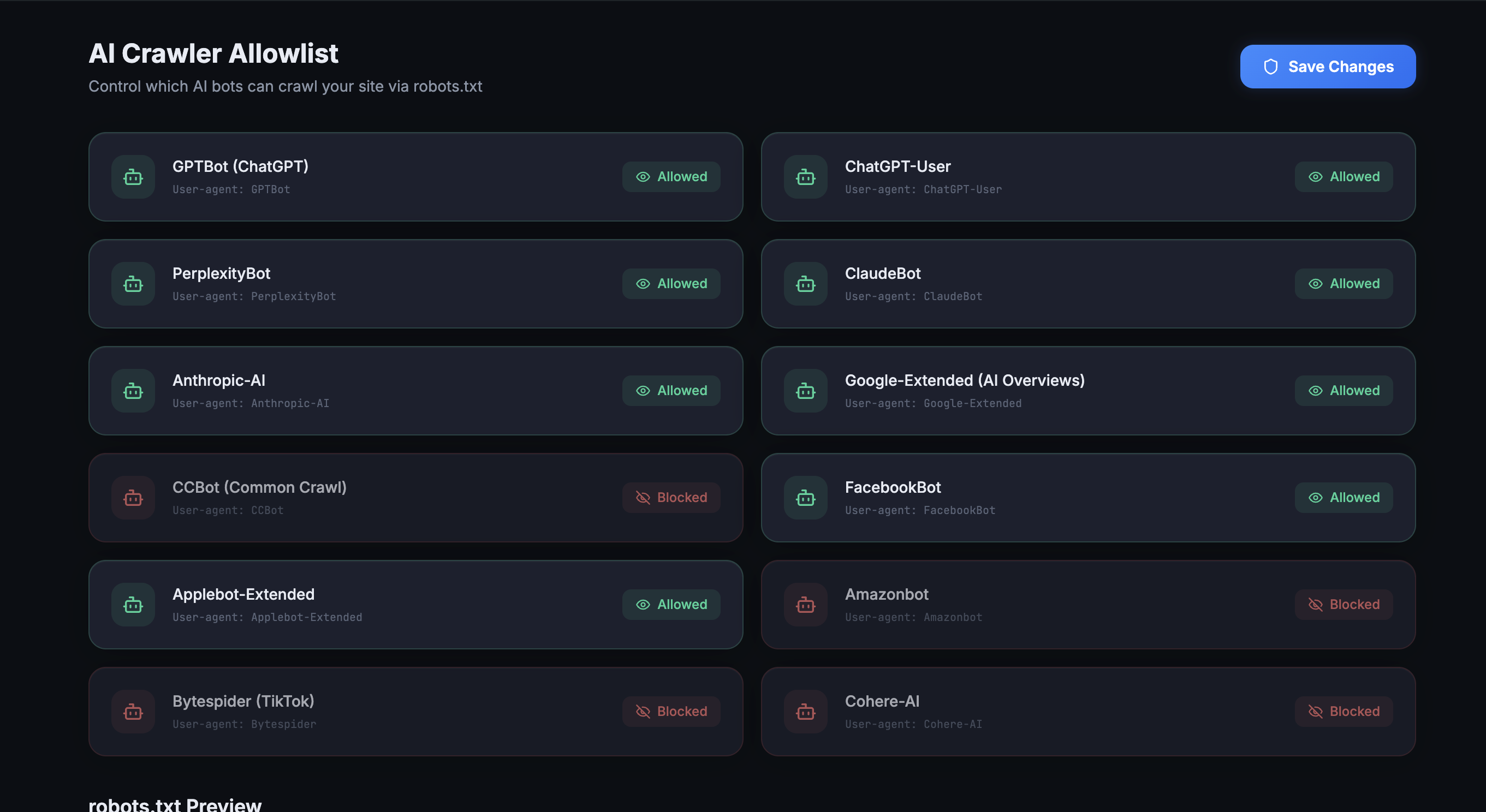
AI Crawler Management (18 Bots)
A configurable allowlist of 18 AI crawlers with individual toggle switches:
| Provider | Bots | Purpose |
|---|---|---|
| OpenAI | GPTBot, OAI-SearchBot, ChatGPT-User | Training, search results, user-triggered fetches |
| Perplexity | PerplexityBot, Perplexity-User | Search indexing, real-time browsing for cited answers |
| Anthropic | ClaudeBot, Claude-SearchBot, Claude-User, Anthropic-AI | Training, search index, user fetches, deprecated legacy bot (3 active + 1 deprecated) |
| Google-Extended | Gemini/Vertex AI training (separate from Google Search) | |
| Apple | Applebot-Extended | Apple Intelligence AI training |
| Meta | Meta-ExternalAgent, FacebookBot | LLaMA training + Meta AI, link previews |
| Others | Amazonbot, Bytespider, CCBot, Cohere-AI, DeepSeekBot | Amazon Alexa, ByteDance/TikTok, Common Crawl, Cohere, DeepSeek |
The crawler visit log records every bot visit with bot name, full user agent, URL visited, HTTP response code, IP address, and timestamp. You can filter by bot, date range, and response code.
This is free.
What AEO Engine offers by comparison: Nothing. No crawler management, no logging, no bot awareness.
llms.txt Generator
Spec-compliant llms.txt file following the official structure from llmstxt.org (proposed by Jeremy Howard). Output structure:
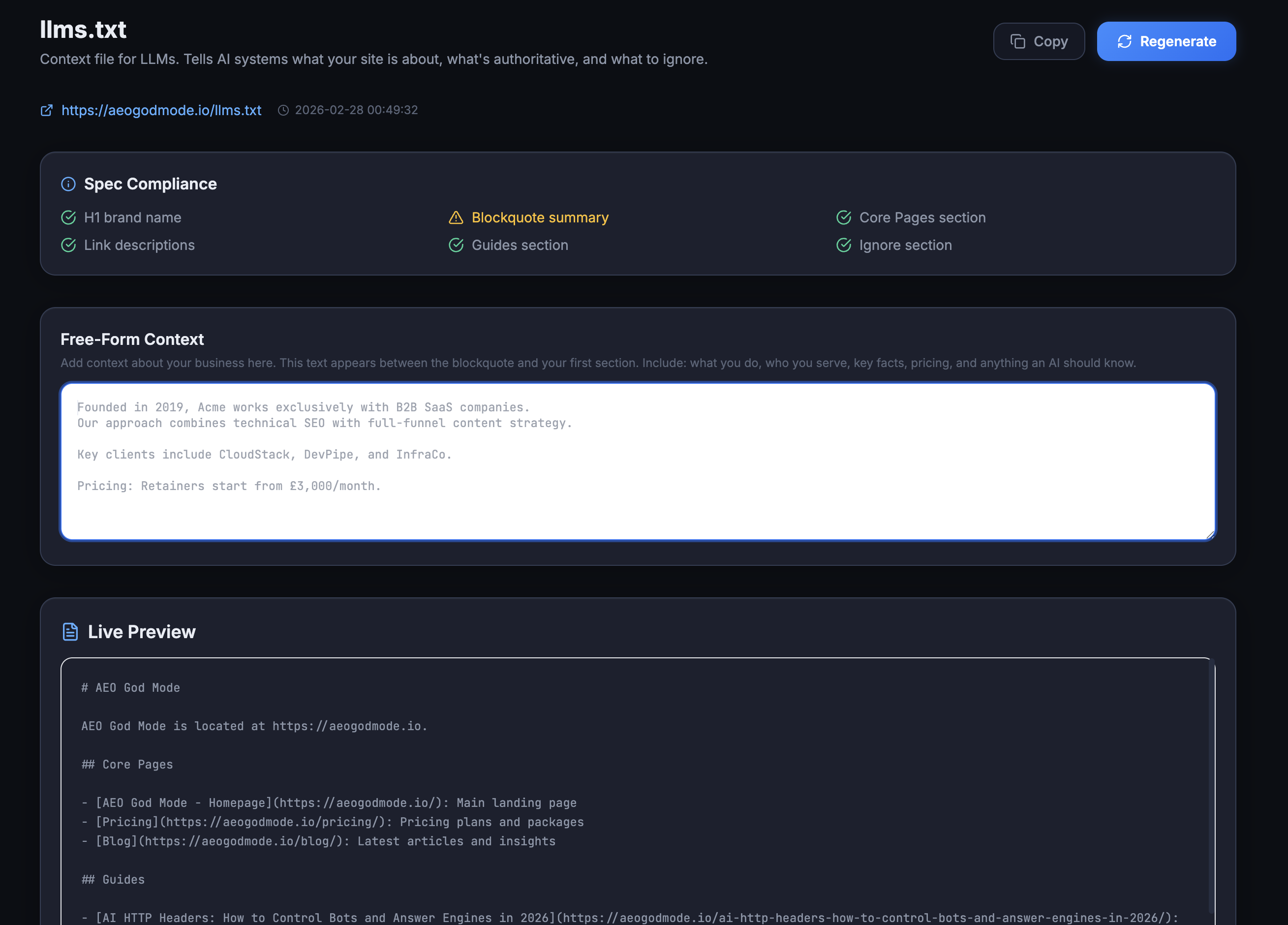
- H1 heading (site name)
- Blockquote (site summary)
- Free-form context section (editable from admin)
- H2 sections: Core Pages, Services/Products, Guides, FAQs
- Optional section: secondary pages
- Links with descriptions for each entry
Automatic content discovery: finds your core pages (homepage, about, pricing, contact, blog), service/product pages (by looking for child pages of “services” or “products” parents), top blog posts (ranked by comment count as a proxy for engagement), and optional secondary pages (team, partners, press, testimonials).
Served at yoursite.com/llms.txt via WordPress rewrite rules.
This is free.
What AEO Engine offers: Nothing. No llms.txt support.
Schema Engine (8 Schema Types)
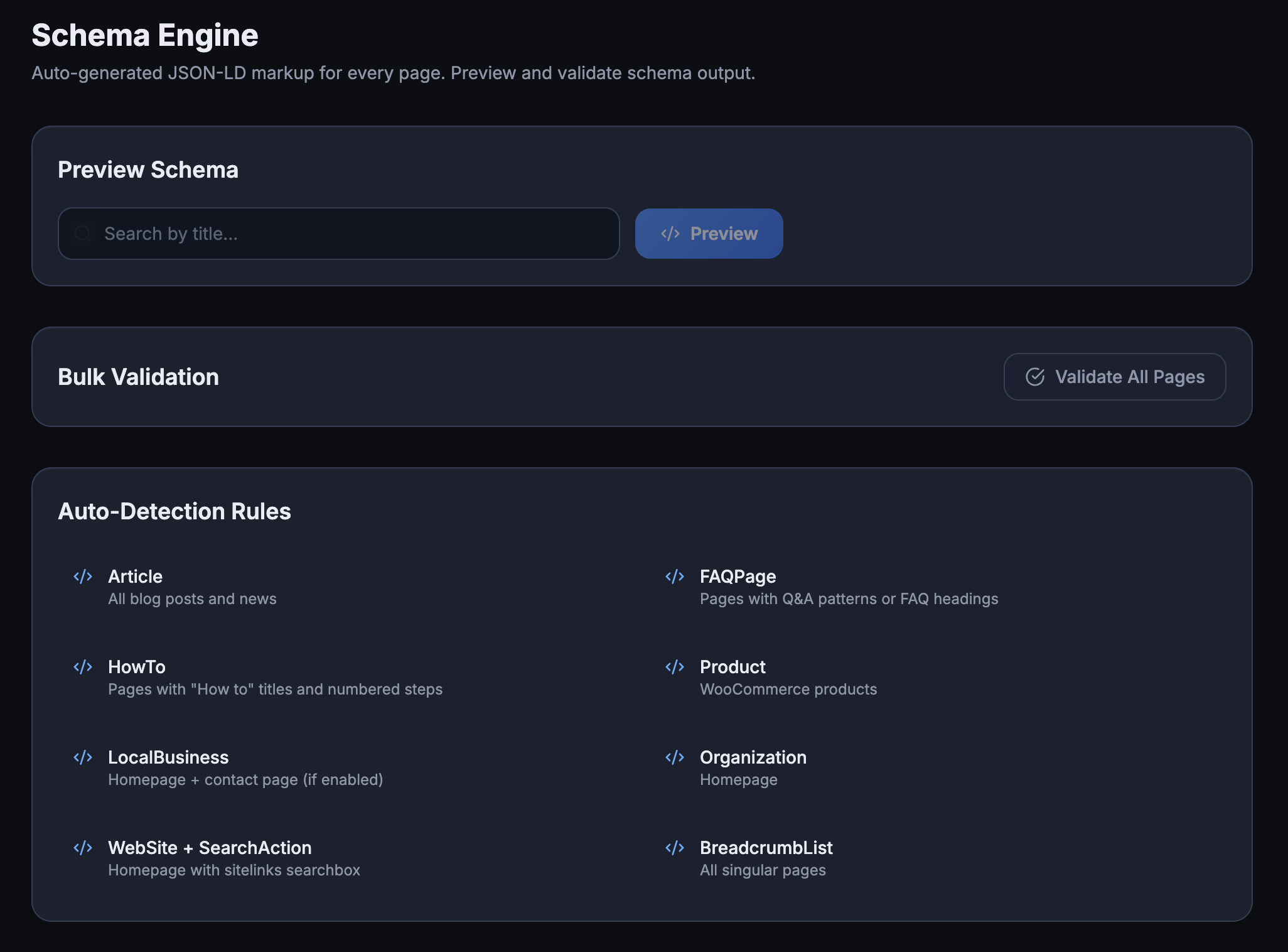
| Schema Type | Detection Method | AEO Engine Support |
|---|---|---|
| WebSite (with SearchAction) | Always on homepage | ❌ |
| Organization (with sameAs) | Always on homepage | ✅ (similar) |
| Article/BlogPosting | Per post | ✅ (similar) |
| BreadcrumbList | Per post with categories | ✅ (similar) |
| FAQPage | Auto-detected from 8 FAQ patterns | ❌ |
| HowTo | Auto-detected from step content | ❌ |
| LocalBusiness | Configured with address, hours, geo | ❌ |
| Product | WooCommerce product data | ❌ |
The FAQ auto-detection is what sets this apart. The engine scans post content for 8 different WordPress FAQ formats:
- Yoast FAQ block markup
- Rank Math FAQ block markup
- Shortcode-based Q&A blocks
- HTML5 accordion elements
- Definition list markup
- CSS-class accordion markup
- Question headings (H2/H3 ending in ?)
- Text-based Q:/A: patterns
When FAQ content is detected, FAQPage schema is automatically generated. No manual configuration needed.
The third_party_handles() method checks whether Yoast or Rank Math already generates a specific schema type and skips it to prevent duplicates. This is built into the core logic.
This is free.
What AEO Engine offers: 5 of these 8 types (Organization, BlogPosting, Breadcrumb, Author, Publisher), with no auto-detection, no conflict checking, and no validator.
Content Gap Scanner
Per-page AEO readiness analysis (932 lines of scanning code). Checks:
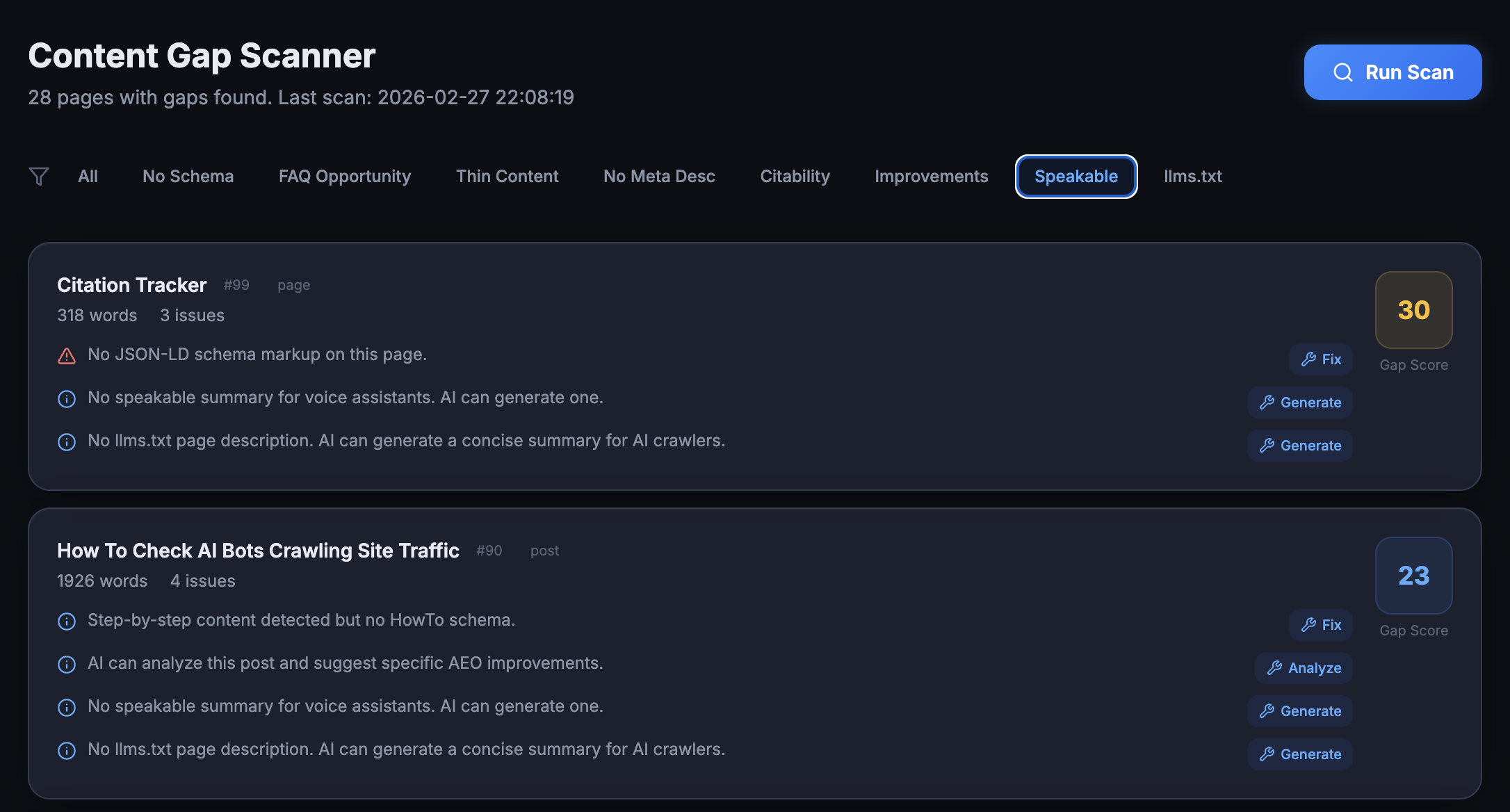
- Has FAQ-style content? (scans for all 8 patterns above)
- Has FAQ schema applied? (checks ASGM schema, Yoast FAQ blocks, Rank Math FAQ blocks, third-party FAQ plugins)
- Has HowTo content? (scans for step-based patterns)
- Has HowTo schema applied?
- Has definitive answer structure? (H2 followed by a direct answer paragraph)
- Has auto-schema detection fired?
For each gap found, an apply_fix() method can generate FAQ pairs, inject schema, or restructure content. The FAQ extraction engine builds proper schema.org/Question entities with AcceptedAnswer.
This is free.
What AEO Engine offers: Nothing. No content analysis.
Conflict Detector
Scans for 7 specific conflict types against Yoast SEO and Rank Math:
- Meta Title duplication → severity: error
- Meta Description duplication → severity: error
- Schema Output duplication → severity: warning
- Robots.txt writer conflicts → severity: warning
- Sitemap conflicts
- Canonical tag conflicts
- Open Graph tag conflicts
For each conflict, you choose: defer (let the other plugin handle it), override (let AEO God Mode handle it), or merge (combine outputs). Resolutions persist across scans.
The plugin is self-aware about what it doesn’t generate: it knows it doesn’t output canonical tags or OG tags, so those checks always return clean.
This is free.
What AEO Engine offers: Nothing. The readme says it’s compatible with Yoast and Rank Math but performs no conflict checking.
AI HTTP Headers
Sends 6 HTTP headers on every front-end page load:
| Header | Value | Condition |
|---|---|---|
X-AI-Crawl |
allowed |
When crawler module is active |
X-AI-Citeable |
true |
Always |
X-Content-License |
free-to-cite-with-attribution |
Always |
X-AI-Content-Type |
human-authored |
Always |
Link |
|
When llms.txt module is active |
X-AI-Speakable |
true |
Only on singular content |
These fire at the network layer before any HTML parsing begins.
This is free.
What AEO Engine offers: Nothing.
Setup Wizard
5-step guided onboarding. Detects existing SEO plugins, configures modules, sets up crawler allowlist, generates llms.txt, and optionally connects to GSC (Pro).
This is free.
Pro Features (£9/mo, billed annually at £90/year)
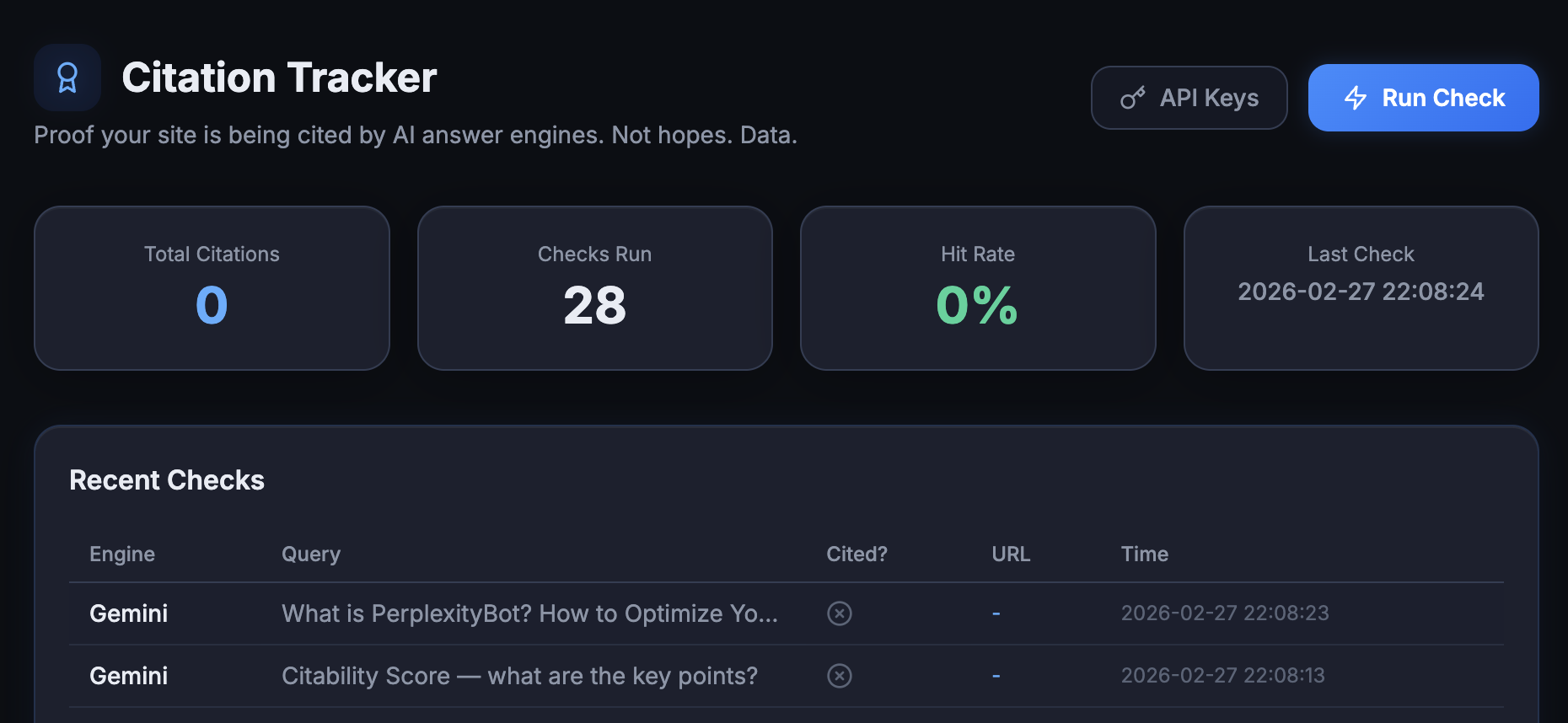
Citation Tracker
Queries 4 AI engines directly using their official APIs:
| Engine | API Method | What It Checks |
|---|---|---|
| Perplexity | OpenAI-compatible format | Cited sources in response |
| ChatGPT | OpenAI API | URL mentions in response text |
| Gemini | generateContent with grounding_metadata | Structured web citations |
| Claude | Messages API with web_search tool | web_search_tool_result blocks |
The tracker generates queries based on your site’s content and published topics, sends them to each configured engine, and checks whether your domain appears in the cited sources. Results include full response text and match data.
Runs on WordPress cron for automated checks. Manual runs also supported. All API keys are encrypted with AES before storage.
Uses BYOK model. You provide your own API keys. No proxy, no middleman. Queries go directly from your server to each AI engine.
Citability Score
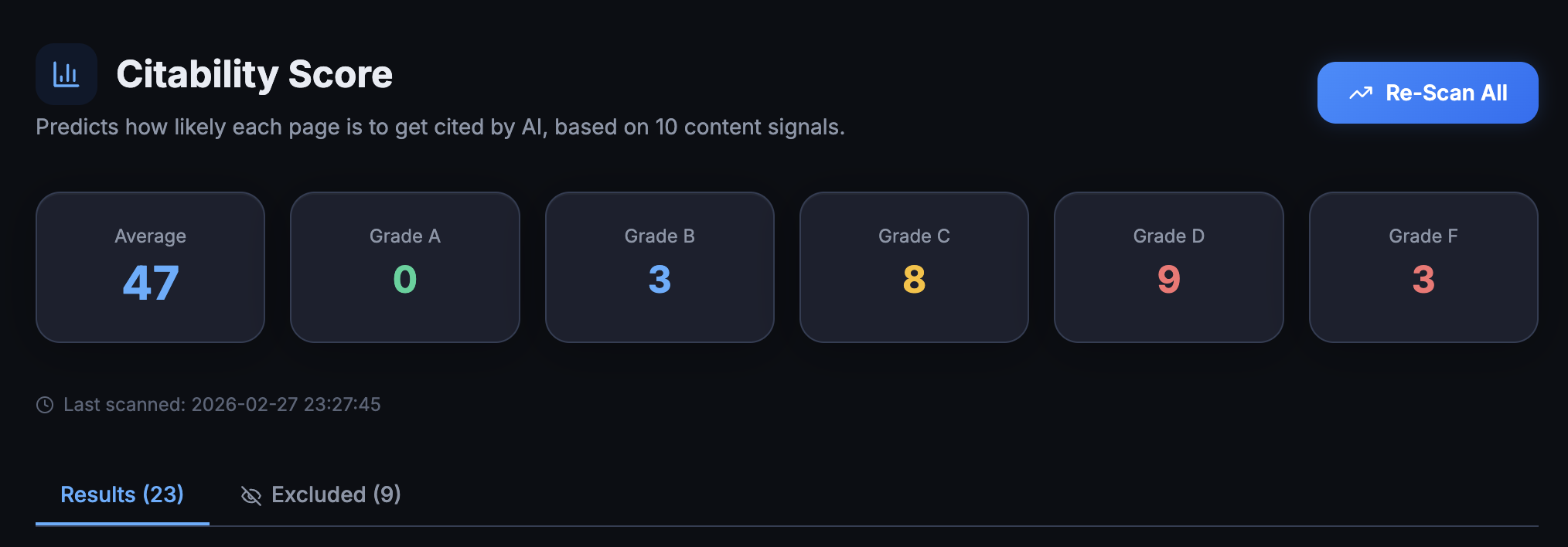
Per-page analysis engine scoring every published post across 9 dimensions:
| Dimension | What It Measures |
|---|---|
| Schema detection | ASGM, Yoast, Rank Math, or JSON-LD in content |
| Direct answer structure | Does the page answer questions directly? |
| Definitive claims | Quotable, factual statements |
| Original data | Statistics, percentages, data points |
| Heading structure | Proper H2/H3 hierarchy |
| Quotable sentences | Short, citable statements |
| Outbound links | External source citations |
| Author attribution | Is the author identified? |
| Content depth | Word count scoring |
Returns a score per page with a letter grade (A through F) and specific fix recommendations. You can exclude posts from scoring.
E-E-A-T Schema Enrichment
Generates Person schema for authors with fields added to WordPress user profiles:
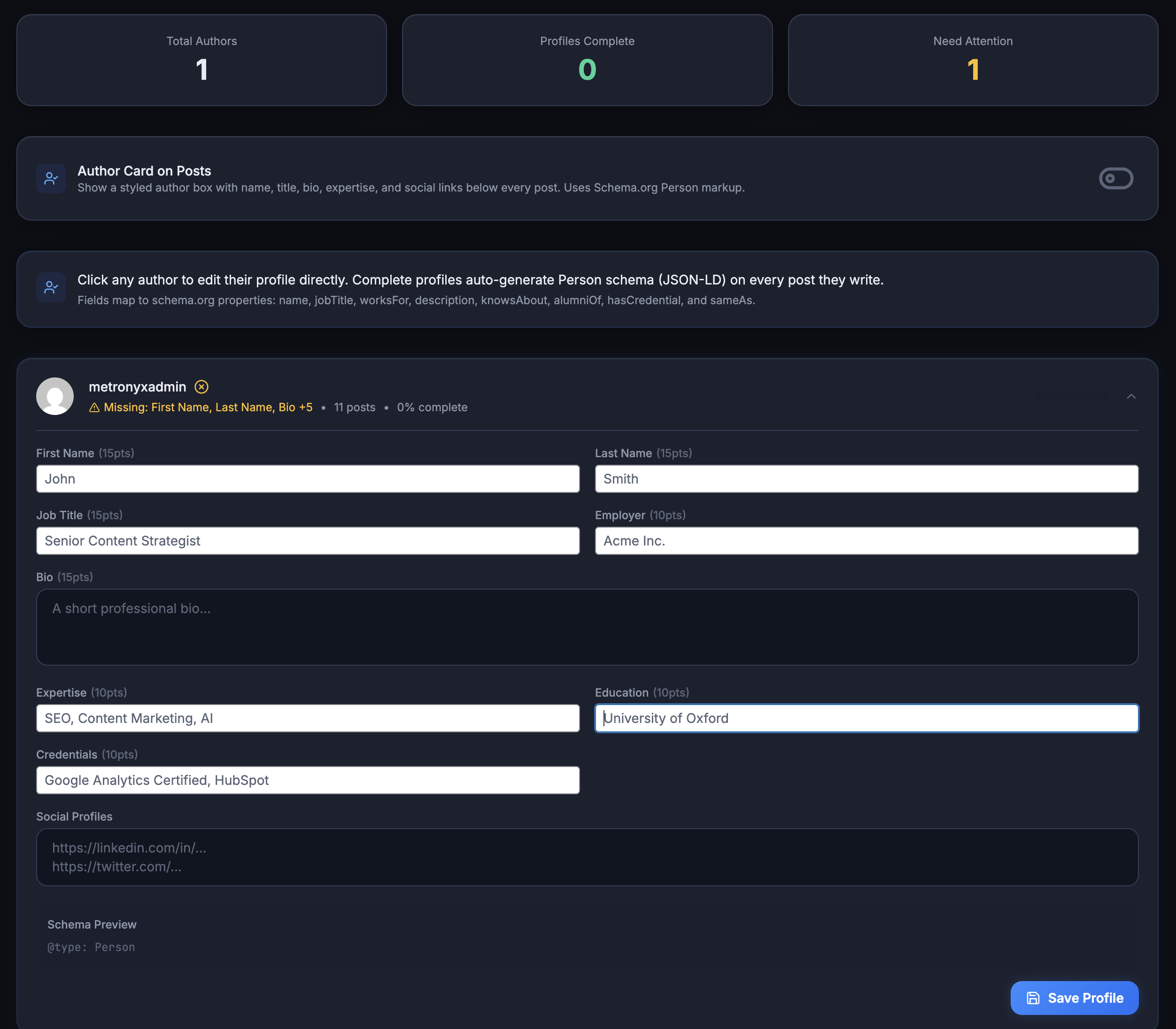
- Job title
- Credentials/qualifications
- Areas of expertise
- Social profiles and professional URLs
Auto-appends author cards to single posts with structured data markup. Targets Google’s E-E-A-T ranking signals, which AI Overviews weight when selecting sources to cite.
AI Referral Traffic Analytics
Tracks human visitors arriving from AI tools (different from the crawler log which tracks bots). Monitors referrals from ChatGPT, Perplexity, Gemini, and Claude domains.
IPs are hashed with SHA-256 using AUTH_SALT for privacy. No raw IP addresses stored. Unique visitor counting works through consistent hashing.
Google Search Console Integration
OAuth-based GSC connection. Syncs search analytics data and filters for AI-related queries.
Agency Tier (£29/mo, billed annually at £290/year)
Everything in Pro, plus: unlimited client sites, white-label admin UI, client reporting dashboard, GSC multi-property support, bulk site management, dedicated account manager.
Where AEO God Mode Falls Short
No prompt simulation. You can’t type a prompt and preview what AI engines would answer. The Citation Tracker checks if you are cited, but it won’t let you see full AI responses to arbitrary queries.
No competitor monitoring. No way to enter competitor domains and compare their citation rates against yours.
No WP.org distribution yet. The plugin is distributed through aeogodmode.io, not the WordPress.org repository. Updates come through a custom updater, not the standard WordPress update system.
BYOK cost adds up. Citation Tracker requires your own API keys for each AI engine. Depending on usage volume, this could add £10-25/month in API costs on top of the £9/month license.
No auto-content generation. AEO God Mode finds gaps and tells you what to fix. It doesn’t write the content for you.
Newer plugin. Less track record than established plugins. The development pace is fast, but the plugin hasn’t had years of battle-testing across thousands of sites.
What “AEO” Actually Means for Each Plugin
AEO Engine interprets “AEO” as “adding schema markup.” In their own readme:
“Automatically generates JSON-LD structured data markup. Designed specifically for Answer Engine Optimization.”
That’s a generous definition. Schema markup is one input into the AEO pipeline, but it’s not the full picture.
AEO God Mode interprets “AEO” as the full stack: crawler access controls, machine-readable site files, structured data, content optimization, conflict management, HTTP-level signaling, and citation measurement.
The difference in scope is clear from the feature count alone. AEO Engine covers 6 features across a single function (schema output). AEO God Mode covers 28+ features across the full AEO pipeline.
Neither interpretation is wrong. But if your goal is getting cited by AI engines, schema alone won’t get you there.
Head-to-Head Feature Comparison
| Feature | AEO Engine (Free) | AEO God Mode (Free) | AEO God Mode Pro (£9/mo) |
|---|---|---|---|
| Organization Schema | ✅ | ✅ | ✅ |
| BlogPosting Schema | ✅ | ✅ | ✅ |
| Breadcrumb Schema | ✅ | ✅ | ✅ |
| Author Schema (Person) | ✅ | ✅ | ✅ |
| Publisher Schema | ✅ | ✅ | ✅ |
| WebSite Schema | ❌ | ✅ | ✅ |
| FAQ Schema (auto-detect) | ❌ | ✅ | ✅ |
| HowTo Schema (auto-detect) | ❌ | ✅ | ✅ |
| LocalBusiness Schema | ❌ | ✅ | ✅ |
| Product Schema (WooCommerce) | ❌ | ✅ | ✅ |
| Schema Validator | ❌ (external links only) | ✅ (built-in) | ✅ |
| Schema Conflict Detection | ❌ | ✅ (7 check types) | ✅ |
| llms.txt Generation | ❌ | ✅ (spec-compliant) | ✅ |
| AI Crawler Allowlist | ❌ | ✅ (18 bots) | ✅ |
| AI Crawler Visit Log | ❌ | ✅ (full details) | ✅ |
| AI HTTP Headers | ❌ | ✅ (6 headers) | ✅ |
| Content Gap Scanner | ❌ | ✅ (per page) | ✅ |
| Content Auto-Fix | ❌ | ✅ | ✅ |
| robots.txt AI Rules | ❌ | ✅ | ✅ |
| Setup Wizard | ❌ | ✅ | ✅ |
| Plugin Import | ❌ | ✅ | ✅ |
| Citation Tracking | ❌ | ❌ | ✅ (4 engines) |
| Citability Score | ❌ | ❌ | ✅ (9 dimensions) |
| E-E-A-T Enrichment | ❌ | ❌ | ✅ |
| AI Referral Analytics | ❌ | ❌ | ✅ |
| GSC Integration | ❌ | ❌ | ✅ |
| Developer Hooks | ✅ | ✅ | ✅ |
| Post Type Controls | ✅ | ✅ | ✅ |
| Data stays on server | ✅ | ✅ | ✅ (except API calls) |
| Annual Cost | £0 | £0 | £90/yr |
| Feature Count | 8 | 22+ | 28+ |
Pricing
AEO Engine is free. No paid version exists. What you see is what you get.
AEO God Mode has three tiers:
| Plan | Cost | Sites | Key Additions |
|---|---|---|---|
| Core | Free | Unlimited | 18-bot crawler management, llms.txt, 8 schema types, content gaps, conflict detector, AI headers, setup wizard |
| Pro | £9/mo (£90/year billed annually, 2 months free) | Up to 5 | Citation Tracker (4 engines), AI Referral Analytics, Citability Score, E-E-A-T Enrichment, GSC, weekly digest, priority support |
| Agency | £29/mo (£290/year billed annually, 2 months free) | Unlimited | White-label UI, client dashboards, GSC multi-property, bulk management, dedicated account manager |
The real pricing question isn’t “free vs paid.” AEO God Mode’s free version already offers 22+ features compared to AEO Engine’s 6. The question is whether you need citation tracking and analytics on top of that.
When AEO Engine Makes Sense
I’m not going to pretend AEO Engine is useless. It fills a narrow gap:
- You only need basic schema. If Organization, BlogPosting, Breadcrumb, Author, and Publisher schema are all you’re after, AEO Engine delivers them cleanly.
- You want a lightweight plugin. AEO Engine is small, lightweight, and does nothing beyond schema output. No bloat.
- You’re a developer who extends via hooks. Standard WordPress filter hooks let you customize schema output.
- You already have everything else covered. If you’re managing AI crawlers via Cloudflare, generating llms.txt through a custom script, and tracking citations manually, then all you need is a schema generator.
When AEO God Mode Makes Sense
Practically every scenario where you care about AI search visibility:
- You want a working AEO stack, not just schema. The free version covers crawlers, llms.txt, 8 schema types, content gaps, conflict detection, and HTTP headers. All the things AEO Engine doesn’t touch.
- You need to measure results. Without citation tracking, referral analytics, or citability scoring, you’re optimizing blind. You have no way to know if your AEO work is producing results.
- You run Yoast or Rank Math. The conflict detector and
third_party_handles()check prevent the duplicate schema problems that AEO Engine ignores entirely. - You manage client sites. The Agency tier with white-label UI, client dashboards, and bulk management is built for agencies.
- Privacy matters. Both plugins run locally, which is good. AEO God Mode’s Pro tier makes external API calls only for citation tracking, using your own keys with direct-to-engine connections. No data goes through a proxy.
The Verdict
AEO Engine is a clean, lightweight schema generator. 5 schema types. No bloat. Does what it says.
AEO God Mode is a full AEO platform. 8 schema types, AI crawler management, llms.txt, content gap analysis, conflict detection, HTTP headers, and optional analytics/tracking.
If your only need is basic schema markup and you want the lightest possible plugin, AEO Engine works fine. But calling it an “AEO solution” overpromises. Schema markup is one piece of a much larger puzzle.
If you want to control which AI bots access your site, generate spec-compliant llms.txt, auto-detect FAQ and HowTo schema from existing content, scan for content gaps, prevent schema conflicts, send AI HTTP headers, and (optionally) track whether any of it is working, then AEO God Mode is the obvious choice.
The free versions of both plugins cost nothing. Install both if you want to compare. You’ll see the difference in scope within five minutes of opening each dashboard.
Frequently Asked Questions
AEO Engine is a schema-only generator that outputs 5 schema types: Organization, BlogPosting, Breadcrumb, Author (Person), and Publisher. AEO God Mode is a full Answer Engine Optimization platform with 8 schema types, AI crawler management for 18 bots, llms.txt generation, content gap scanning, conflict detection, AI HTTP headers, and optional Pro features including citation tracking across 4 AI engines and per-page citability scoring.
Yes, AEO Engine is 100% free with no paid tier. AEO God Mode also has a free version that includes AI crawler management (18 bots), llms.txt generation, 8 schema types with auto-detection, content gap scanning, conflict detection, and AI HTTP headers. AEO God Mode Pro costs £9 per month (£90 per year billed annually) for citation tracking, citability scoring, E-E-A-T enrichment, and analytics.
No. AEO Engine generates Schema.org JSON-LD markup (Organization, BlogPosting, Breadcrumb, Author, and Publisher). It doesn’t create llms.txt files, manage AI crawler access, scan for content gaps, check for schema conflicts, or track AI citations. AEO God Mode generates spec-compliant llms.txt files as part of its free tier.
No. AEO Engine claims compatibility with Yoast, Rank Math, and AIOSEO but doesn’t check for duplicate schema output. If both plugins generate Organization or BlogPosting schema, you get duplicate markup in your HTML. AEO God Mode has a built-in conflict detector that checks 7 conflict types and a third_party_handles() method that skips schema types already generated by your existing SEO plugin.
No. Schema markup helps AI engines understand your content structure, but AEO also requires proper AI crawler access controls (robots.txt, allowlists), llms.txt files for site context, AI HTTP headers, structured FAQ and HowTo content, content gap analysis, and ongoing citation monitoring. Schema is one input into a much larger pipeline.
If you want a complete AEO solution, install AEO God Mode. Its free version includes 22+ features covering the full AEO pipeline. If you only need basic schema (Organization, BlogPosting, Breadcrumb, Author, Publisher) and nothing else, AEO Engine is a lightweight option. For businesses that need citation tracking and analytics, AEO God Mode Pro at £9 per month is the most comprehensive option available.
AEO Engine supports 5 schema types: Organization, BlogPosting, Breadcrumb, Author (Person), and Publisher. AEO God Mode supports 8 schema types: WebSite, Organization, Article/BlogPosting, BreadcrumbList, FAQPage (auto-detected), HowTo (auto-detected), LocalBusiness, and Product (WooCommerce). AEO God Mode Pro adds E-E-A-T Person schema for author enrichment.